
Data Residency in Azure: What SMBs Need to Know
UK SMBs must enforce Azure region controls and encryption to meet data residency requirements and avoid costly regulatory fines.

Storing your data in the right location is critical for UK SMBs. Here's why:
- Compliance: UK laws like GDPR and the Data Protection Act 2018 require businesses to know where their data is stored. Azure's UK regions (London and Cardiff) ensure data stays within the country.
- Performance: Keeping data closer to users reduces latency, but UK regions cost about 10% more than US options.
- Risk Management: Poor data residency practices can lead to fines, as seen with Capita's £14 million penalty in 2025.
Key Takeaways:
- Use Azure's UK South (London) and UK West (Cardiff) regions for sensitive data.
- Enforce location policies with Azure tools like Azure Policy and Key Vault.
- Balance costs by using Azure Hybrid Benefit and deploying non-critical workloads in cheaper regions.
Azure provides the infrastructure, but compliance is your responsibility. Proper planning, automation, and monitoring are essential to avoid costly mistakes.
What is Data Residency and Why SMBs Should Care
Data Residency Defined: Azure's Approach
Data residency refers to the legal jurisdiction governing where your business data is stored and processed. The National Cyber Security Centre (NCSC) highlights in their Cloud Security Guidance v2.0:
"Using a cloud service does not automatically mean your data will be subject to laws in the country where the cloud provider is headquartered, but you should assess this risk as part of your supply chain security evaluation."
Azure addresses data residency through defined Geographies, which are fixed regions like the United Kingdom, Europe, or the United States. For Regional Services such as Virtual Machines and SQL Database, Microsoft ensures that data remains within the chosen Geography.
This is backed by technical safeguards, including AES-256 encryption for data at rest, TLS 1.2+ encryption for data in transit, and IEEE 802.1AE MACsec protection at the network level. These measures not only protect data but also meet the compliance needs essential for SMBs, offering a solid foundation for security and growth.
Why SMBs Need Data Residency: Compliance, Security, and Growth
Azure’s structured approach to data residency offers SMBs clear advantages in terms of compliance, security, and business development.
Regulatory compliance is a key driver. UK GDPR Article 28 requires "appropriate technical and organisational measures", and storing data within UK regions aligns with both the Data Protection Act 2018 and the Data (Use and Access) Act 2025. It also simplifies meeting the Information Commissioner's Office (ICO) 72-hour breach notification rule under UK GDPR Article 33.
For financial institutions, the stakes are even higher. The Prudential Regulation Authority’s (PRA) operational resilience rules, effective from March 2025, demand specific disaster recovery setups. Azure’s paired UK regions - UK South and UK West - meet these requirements while ensuring data remains within the UK.
Business growth also hinges on data residency. Many regulated industries, like healthcare and finance, require proof of UK data residency before entering into contracts. The UK Government’s National Data Strategy, updated in October 2025, prioritises "data infrastructure sovereignty", signalling stricter expectations for all sectors moving forward.
Azure UK South now offers over 60 services with guaranteed data-at-rest storage within UK borders. Since Q2 2025, expanded GPU compute capacity in UK South enables SMBs to train and run AI models entirely within the UK - an essential capability for businesses handling sensitive data through machine learning.
sbb-itb-6ec400b
Implement Azure Policy To Keep Data In Your Country
Azure Regions and Geographies: How They Support Data Residency
Azure UK Regions Comparison: UK South vs UK West for Data Residency
How Azure Regions and Availability Zones Work
Azure's infrastructure is organised into geographies and regions, giving SMBs precise control over data storage locations. A geography refers to a defined area, such as a country or a multi-national region like Europe, and contains one or more regions. A region, in turn, is made up of physical datacentres interconnected by a high-capacity, low-latency network.
This setup ensures compliance with legal data residency requirements while providing the scalability and resilience of the cloud.
To enhance reliability, Azure incorporates Availability Zones (AZs). These are separate datacentres within a region, each equipped with independent power, cooling, and networking systems. They are connected with sub-two-millisecond latency. In AZ-enabled regions, Azure links at least three distinct datacentres, delivering a 99.99% uptime SLA for virtual machines while ensuring data remains within the designated residency boundary.
For disaster recovery, Azure employs region pairs within the same geography. These paired regions (e.g., UK South and UK West) allow for data replication without crossing national borders, ensuring compliance during failovers. Additionally, all data transfers between datacentres are encrypted using MACsec standards.
Azure Regions in the UK: Meeting Local Requirements
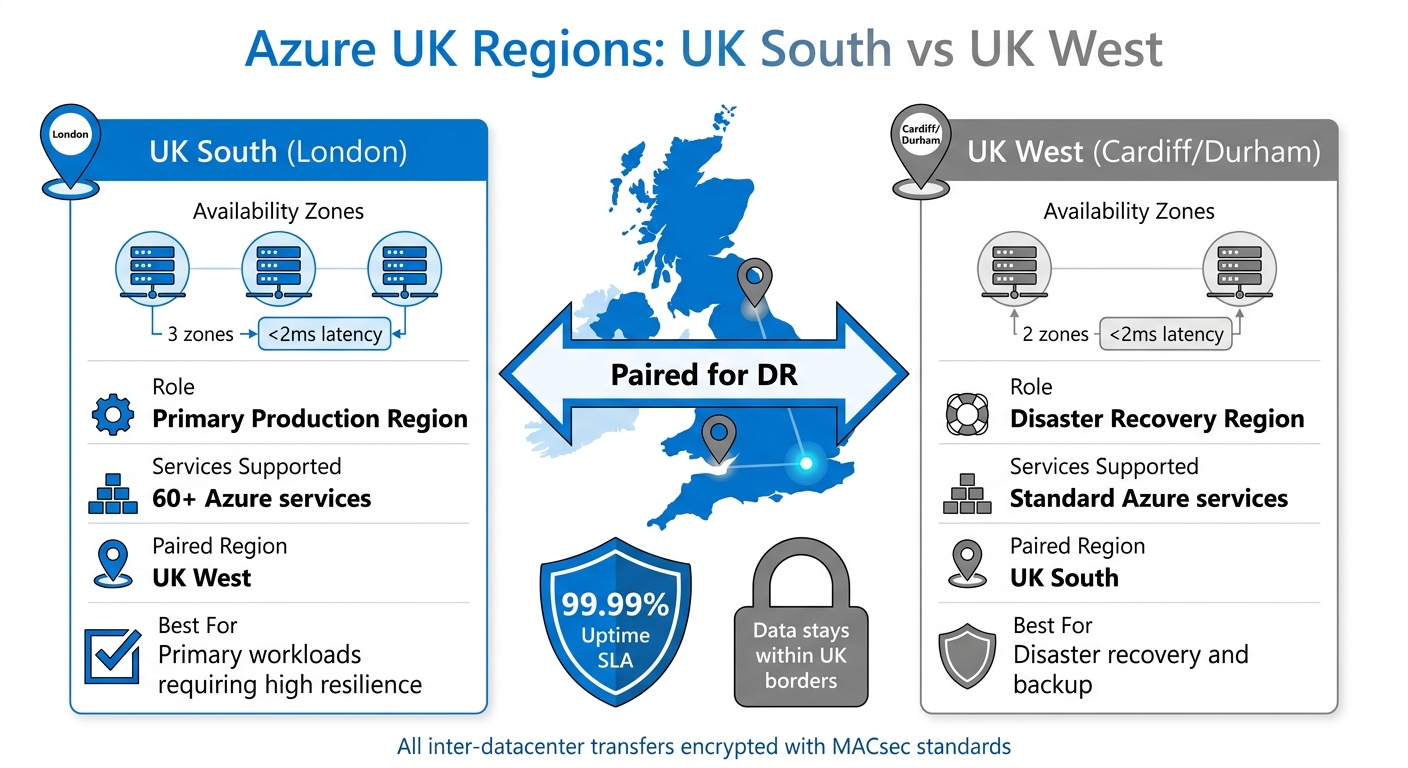
Azure's global infrastructure adapts to meet specific regional needs in the UK, ensuring both compliance and resilience. The UK geography includes two primary regions: UK South (London) and UK West (Cardiff and Durham). UK South acts as the main production region, featuring three availability zones and supporting over 60 Azure services. Meanwhile, UK West serves as the paired disaster recovery region, with two availability zones.
| UK Region | Physical Location | Availability Zone Support | Paired Region |
|---|---|---|---|
| UK South | London | Yes (3 zones) | UK West |
| UK West | Cardiff/Durham | Yes (2 zones) | UK South |
For SMBs requiring high resilience, UK South is the recommended choice for primary workloads due to its availability zones and extensive service offerings. Microsoft also ensures that planned maintenance does not simultaneously impact both paired regions, maintaining operational resilience.
When planning deployments, it's essential to ensure ongoing compliance with data residency requirements. Before deploying, verify that services do not store metadata outside the geography. Some non-regional services, such as Azure DNS and Microsoft Entra ID, operate globally but generally do not store customer data. To avoid accidental violations, Azure Policy can be used to enforce resource deployments exclusively within UK regions.
How SMBs Can Ensure Data Residency in Azure
Selecting the Right Azure Region for Your Business
When deciding on an Azure region, start by understanding your legal responsibilities. For SMBs in the UK, compliance with UK GDPR, the Data Protection Act 2018, and the Data (Use and Access) Act 2025 is essential. These laws require businesses to know exactly where their customer data is stored and how it’s safeguarded.
The UK South and UK West regions are key for businesses needing to meet UK-specific regulations. However, not all Azure services are available in every region, so double-check service availability before deployment. For instance, certain virtual machine types or AI services might only be supported in specific locations. Use the "Azure products available by region" tool to ensure compatibility with your needs.
Performance is another factor. The physical distance between your users and the data centre affects network latency. Azure provides tools to measure network round-trip latency, helping you decide if UK South meets your performance expectations. Keep in mind, though, that UK South is about 10% more expensive than US East regions. You can reduce costs using Azure Hybrid Benefit.
It’s also important to understand the difference between regional services and non-regional services. Regional services like VMs, SQL Database, and Azure Storage let you control where data is stored. Non-regional services, such as Microsoft Entra ID and Traffic Manager, may replicate data globally for operational reasons. Document these non-regional services in your Transfer Impact Assessments, as deploying in a UK region doesn’t entirely eliminate transfer risks.
"Using a cloud service does not automatically mean your data will be subject to laws in the country where the cloud provider is headquartered, but you should assess this risk as part of your supply chain security evaluation." - NCSC Cloud Security Guidance v2.0
Once you’ve chosen a region, use Azure Policy to enforce your selection and ensure compliance.
Using Azure Policy to Control Data Location
Azure Policy offers a way to automatically enforce data residency rules, helping you avoid costly compliance mistakes. For example, in October 2025, the ICO fined Capita £14 million for a data breach that affected 90,000 individuals, citing poor technical safeguards. Azure Policy can prevent such incidents by blocking non-compliant resource deployments.
Set up policies to restrict deployments to UK South and UK West. The "Allowed Locations" policy is particularly useful, as it denies resource creation outside your approved regions. Start by running these policies in audit mode to identify non-compliant resources without disrupting operations. Once you’ve addressed any issues, switch to "deny/enforce" mode for stricter control.
Apply these policies at the Management Group level to ensure consistent governance across all subscriptions. Microsoft’s "Sovereignty Baseline" starter policies provide a great starting point, and you can customise them to meet UK-specific needs.
For sensitive workloads, consider using Azure Key Vault in UK South with customer-managed keys (CMK). This approach gives you greater control over data jurisdiction. Regularly review compliance dashboards to maintain a "sovereign by design" approach.
While ensuring compliance, you can also manage costs effectively by leveraging Azure Hybrid Benefit.
Reducing Costs with Azure Hybrid Benefit
Azure Hybrid Benefit (AHB) helps SMBs cut Azure costs by allowing the use of existing on-premises Windows Server and SQL Server licences with Software Assurance. This is especially useful for offsetting the higher costs of UK-compliant regions.
For example, UK South is about 10% more expensive than US East for storage, compute, and database services. For a medium-sized workload - 50 virtual machines and 10TB of storage - this could mean an extra £4,800 annually. AHB can help reduce these costs by lowering licensing expenses for Windows and SQL Server workloads.
Use the Azure Pricing Calculator to compare costs across compliant regions and find the best balance between price and performance. For workloads that don’t involve sensitive data, consider deploying them in more affordable regions while keeping regulated data in UK South or UK West. This tiered strategy allows you to stay compliant without overspending.
When deploying Azure OpenAI services, opt for "DataZone" or regional deployment types instead of "Global" to ensure data remains within specified boundaries. Use Azure Cost Management to keep track of expenses and identify areas for optimisation. For more tips on cost-saving strategies, check out Azure Optimization Tips, Costs & Best Practices.
Azure Tools and Services for Data Protection and Residency
Azure Site Recovery for Business Continuity
Azure Site Recovery (ASR) is designed to support disaster recovery while keeping data within approved UK regions. It ensures that customer data stays within the source and target regions you select, making it a practical solution for SMBs with strict residency needs.
For compliance in the UK, you can configure ASR to replicate data between UK South and UK West - a region pair reserved for in-country disaster recovery. While the customer data itself remains confined to these regions, the Recovery Services Vault, which only stores metadata, can be located in a different region if necessary.
To minimise the impact on production systems, set up a local cache storage account to temporarily store VM changes before replication. By default, ASR creates crash-consistent recovery points every five minutes. If you're dealing with database-heavy workloads, it's essential to manually enable app-consistent snapshots. These snapshots capture memory-resident data and pending transactions, which are not included by default.
For workloads requiring high levels of sovereignty, ensure encryption keys (using Azure Disk Encryption or customer-managed keys) are accessible in the target region. Managed HSM with multi-region replication is a reliable option for this purpose. Additionally, all Azure traffic between datacentres is secured using IEEE 802.1AE MAC Security Standards (MACsec), protecting against physical interception.
To strengthen your disaster recovery strategy, consider combining Azure's built-in capabilities with third-party backup tools.
Veeam Backup Solutions with Azure Integration

While Azure offers robust disaster recovery features, third-party tools like Veeam can add another layer of protection. When integrating such solutions with Azure, ensure that any data shared with external providers complies with the same residency requirements. To support this, Microsoft provides an "Online Services Subprocessors List", detailing third-party integrations that meet its residency and security standards.
Azure Policy can help enforce data residency requirements when using integrated solutions. This is crucial for maintaining compliance with regulatory standards. For environments exceeding 100 TiB, tools like Komprise can assess file shares before migration, ensuring data integrity and compliance throughout the process.
To maintain control over sensitive data, store encryption keys in Azure Key Vault Managed HSM. This ensures that only authorised entities can access the data, even when third-party integrations are involved. This approach safeguards your information while keeping it aligned with stringent residency and security requirements.
Common Data Residency Challenges for SMBs and How to Solve Them
Managing Residency Compliance on a Budget
Using UK South's core compute and storage services comes with a 10% higher cost compared to US East regions. But costs aren't just about infrastructure - manual compliance processes can take days of staff time during audits. For SMBs, this often means last-minute efforts to gather documentation, confirm data locations, and demonstrate compliance to clients or regulators. Barry O'Donnell, CTO at TSG, summarises the challenge:
"Compliance requirements expand whilst internal resources stay flat. You're juggling GDPR, Data Protection Act 2018, Cyber Essentials, ISO standards, and sector-specific regulations".
To manage costs, deploy only residency-sensitive workloads in premium UK regions and shift non-critical systems to lower-cost zones. Opt for Locally Redundant Storage (LRS) or Zone-Redundant Storage (ZRS) instead of the more expensive Geo-Redundant Storage, which replicates data across multiple regions. Use Azure Policy to restrict deployments to compliant regions, starting in audit mode to identify issues without disrupting existing systems. Once fine-tuned, switch to deny mode to prevent non-compliant deployments.
The stakes are high. For example, Capita's £14 million ICO fine in October 2025 for inadequate technical measures highlights the risks of non-compliance. O'Donnell puts it bluntly:
"The question isn't whether you can afford automated compliance. It's whether you can afford not to have it when the next audit arrives".
These challenges make it clear that SMBs need a strategic approach to Azure deployment - one that balances cost-saving measures with strong compliance practices. Leveraging Azure's built-in tools can help automate and enforce data residency policies, reducing the burden on IT teams.
Simplifying Data Residency with Azure Tools
Configuration drift is a common issue that can jeopardise data residency compliance. Over time, carefully set security configurations can change as exceptions are made, often going unnoticed until an external review flags them. For SMBs with limited IT resources, relying on manual checks isn't practical.
Azure Policy is a powerful tool to prevent resource deployments outside approved regions like UK South and UK West. By grouping individual policies into initiatives - such as Level 1 for residency and Level 2 for encryption - SMBs can ensure consistent governance across all subscriptions with just one assignment. Additionally, configuring Azure Monitor Log Analytics workspaces in the same region as your workloads ensures diagnostic data stays local.
For ongoing compliance, Microsoft Defender for Cloud automates assessments against regulatory standards, cutting audit preparation time by 60–70% compared to manual processes. By packaging compliance requirements into standardised templates, new projects can align with standards from the start, reducing configuration time from days to just under an hour.
However, it's important to note that some global services, like Azure Front Door and Traffic Manager, don't allow region-specific configurations and may replicate data globally. Even if data is stored within the UK, the US CLOUD Act could allow US authorities to request access to it. To address this, document these risks in Transfer Impact Assessments (TIAs) for third-party subprocessors and global support personnel who might access the data.
Conclusion
Data residency plays a critical role for UK SMBs. With regulations like the UK GDPR and the Data (Use and Access) Act 2025 mandating strict oversight of data storage and protection, getting familiar with Azure's regional setup is more than just a good idea - it's essential. The Capita case, which resulted in a £14 million ICO fine due to inadequate technical safeguards, underscores the financial consequences of failing to comply.
To mitigate these risks, proper configuration of your Azure environment is not optional. While Azure offers a solid infrastructure through its UK South and UK West regions, meeting regulatory requirements demands active participation. The policies and encryption options discussed earlier require careful implementation. Microsoft handles the security of Azure’s core platform, but ensuring data residency compliance remains your responsibility.
Though Azure UK South has a 10% price premium, this is a small price to pay when compared to potential GDPR fines, which can climb as high as 4% of global turnover. Tools like Microsoft Defender for Cloud can also streamline compliance efforts, reducing audit preparation time by up to 70%.
To stay compliant, enforce region restrictions, categorise your data into appropriate tiers, and ensure disaster recovery plans remain within UK borders. For highly sensitive workloads, consider employing customer-managed keys and confidential computing to protect data during processing.
These practices form a well-rounded strategy for maintaining data residency, reinforcing the importance of active governance. Azure’s certifications and regional pairings offer a strong starting point, but success hinges on continuous effort. Document risks, such as those related to the US CLOUD Act, in your Transfer Impact Assessments, automate evidence collection, and treat data residency as an ongoing operational focus.
For more guidance on streamlining your Azure deployment - including cost-saving strategies and practical tips - check out Azure Optimization Tips, Costs & Best Practices.
FAQs
Does choosing UK South/UK West guarantee my data stays in the UK?
Choosing the UK South or UK West regions in Microsoft Azure doesn't necessarily mean all your data will stay strictly within the UK. While Azure ensures compliance with ICO (Information Commissioner's Office) regulations and provides options for region-specific configurations, certain services or setups might result in some data being processed or stored outside the UK. Always review the specific service details and configurations to understand where your data might reside.
Which Azure services can still move or replicate data outside the UK?
Azure offers services that may transfer or replicate data outside the UK, including some non-regional services that are in the process of being restructured to align with the EU Data Boundary. Certain services are already set up to handle data transfers outside the UK, depending on the progress of these updates and architectural changes. To ensure your data residency requirements are met, it's essential to review the specific configurations of the services you're using.
How can I prove UK data residency to auditors or customers?
To demonstrate that your data resides in the UK, ensure it is stored and processed within the UK South and UK West regions. This aligns with ICO guidance and complies with UK GDPR requirements. You can use Azure's regional architecture and compliance documentation as proof. Additionally, keep detailed records of your deployments in these regions to substantiate your claims.