
Azure Backup for Healthcare: HIPAA Use Cases
Practical guidance on using Azure Backup to meet HIPAA: encryption, CMKs, RBAC, immutable backups, cross-region restore and retention.

Protecting healthcare data is non-negotiable. With HIPAA regulations enforcing strict standards, Azure Backup offers healthcare organisations tools to safeguard electronic Protected Health Information (ePHI). However, compliance isn't automatic - it requires proper configuration and governance.
Key Highlights:
- Encryption: Azure Backup secures data at rest (SSE, ADE, TDE) and in transit (TLS 1.2). Use Customer-Managed Keys (CMKs) in Azure Key Vault for better control.
- Access Controls: Role-Based Access Control (RBAC), Multi-Factor Authentication (MFA), and Privileged Identity Management (PIM) limit access and reduce risks.
- Audit Trails: Diagnostic logging and Azure Backup Reports help meet HIPAA's six-year documentation requirement.
- Ransomware Defence: Features like immutable backups and soft delete ensure data integrity.
- Disaster Recovery: Cross-region restore ensures data availability even in catastrophic failures.
Azure Backup is a powerful tool for HIPAA compliance, but success depends on deliberate configuration, regular testing, and adherence to retention policies.
How Healthcare Organizations Can Protect Patient Data with Azure HIPAA Compliance
sbb-itb-6ec400b
How Azure Backup Meets HIPAA Requirements
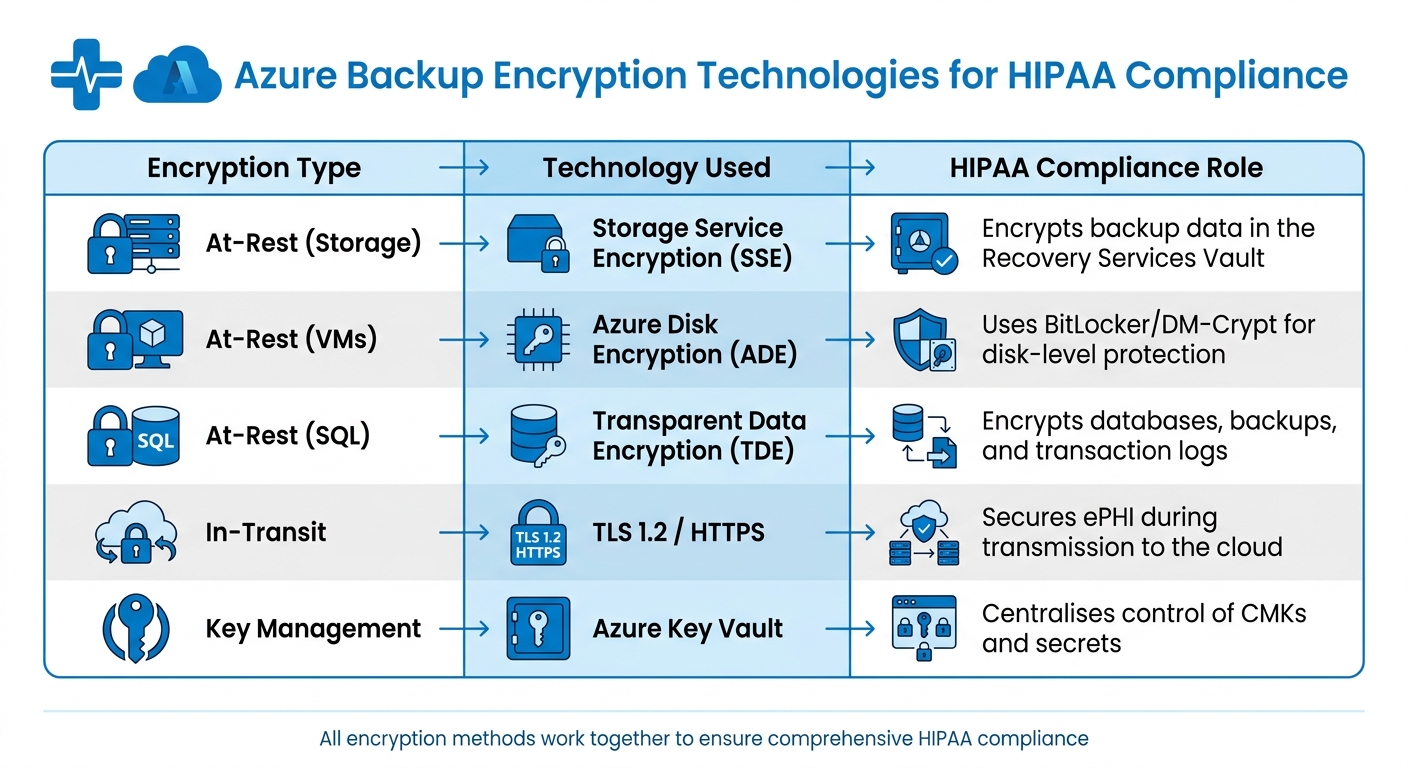
Azure Backup Encryption Technologies for HIPAA Compliance
Azure Backup ensures compliance with HIPAA security requirements by safeguarding electronic protected health information (ePHI) from its creation through to long-term retention. Below, we’ll explore how encryption, access controls, and audit trails work together to meet these standards.
Encryption and Security Features
Azure Backup employs multiple layers of encryption to protect data. It encrypts data at rest using Storage Service Encryption (SSE) and secures data in transit with TLS 1.2. For virtual machines, BitLocker (for Windows) and DM-Crypt (for Linux) provide disk-level encryption, while Transparent Data Encryption (TDE) secures databases, backups, and transaction logs.
When it comes to encryption keys, Microsoft-managed keys may suffice in some scenarios, but production environments subject to HIPAA audits often require Customer-Managed Keys (CMK) stored in Azure Key Vault. As Rohit Dabra, CTO at QServices IT Solutions, points out:
Storing encryption keys in application config files, environment variables checked into source control, or hardcoded in code is a HIPAA violation waiting to happen. All keys must live in Azure Key Vault, accessed exclusively via managed identities.
To further secure encryption keys, enabling both soft-delete and purge protection on Key Vaults is essential. This prevents accidental or malicious deletion of critical keys.
| Encryption Type | Technology Used | HIPAA Compliance Role |
|---|---|---|
| At-Rest (Storage) | Storage Service Encryption (SSE) | Encrypts backup data in the Recovery Services Vault |
| At-Rest (VMs) | Azure Disk Encryption (ADE) | Uses BitLocker/DM-Crypt for disk-level protection |
| At-Rest (SQL) | Transparent Data Encryption (TDE) | Encrypts databases, backups, and transaction logs |
| In-Transit | TLS 1.2 / HTTPS | Secures ePHI during transmission to the cloud |
| Key Management | Azure Key Vault | Centralises control of CMKs and secrets |
Encryption is just one part of the equation; robust access controls are equally critical.
Access Controls and Monitoring
HIPAA compliance requires strict access controls, with a focus on enforcing the principle of least privilege. Azure Backup uses Role-Based Access Control (RBAC) to limit access based on roles. For example:
- Backup Contributor: Can create and manage backups but cannot delete vaults.
- Backup Operator: Handles backup and restore operations.
- Backup Reader: Provides view-only access for compliance monitoring.
To reduce risks from compromised accounts, Multi-User Authorisation (MUA) adds a layer of approval for sensitive actions, like disabling soft-delete or reducing retention periods. Placing the Resource Guard in a separate subscription managed by your security team ensures no single administrator can delete ePHI backups.
Azure Backup also integrates with Microsoft Entra ID to enforce Multi-Factor Authentication (MFA) and Conditional Access policies. Privileged Identity Management (PIM) enables just-in-time, time-bound authorisation, ensuring elevated permissions are granted only when absolutely necessary. To minimise risk, limit subscription owners to no more than three.
Audit Trails and Reporting
Azure Backup provides extensive audit capabilities to meet HIPAA’s six-year documentation requirement. Azure Activity Logs track every management action on the backup vault, recording details like who performed the action and when. However, Diagnostic Logging must be explicitly enabled to capture data access events, including SQL audit logs and Key Vault access logs.
To centralise monitoring, stream logs to a Log Analytics Workspace. This allows for detailed analysis and reporting. Azure Backup Reports, powered by Azure Monitor Logs, provide insights into backup job history, retention compliance, and the status of protected items. For enhanced threat detection, Microsoft Sentinel can identify high-risk activities, while Microsoft Defender for Cloud offers a Regulatory Compliance dashboard to map scores to HIPAA and HITRUST controls.
To meet the six-year retention requirement while optimising costs, keep logs in Log Analytics for 90 days, then move them to cool or archive-tier Blob Storage. This approach can reduce storage expenses by up to 50%.
HIPAA Use Cases for Azure Backup in Healthcare
Azure Backup helps healthcare organisations tackle compliance challenges, particularly around safeguarding electronic protected health information (ePHI). Below, we explore how Azure Backup supports HIPAA requirements in areas like ransomware defence, disaster recovery, and data retention.
Backing Up ePHI in Azure Virtual Machines
For healthcare providers using Azure Virtual Machines (VMs), Azure Backup ensures robust encryption of electronic health record (EHR) data. It employs Azure Disk Encryption (ADE) with BitLocker for Windows and DM-Crypt for Linux. To strengthen security, customer-managed keys (CMK) stored in Azure Key Vault provide better audit trails compared to Microsoft-managed keys.
To meet HIPAA's six-year documentation retention requirement, organisations can configure long-term retention (LTR) policies for seven years, offering a safety margin. For SQL databases storing patient records, a backup schedule involving weekly full, daily differential, and 5–15 minute transaction log backups minimises recovery point objectives (RPO). Additionally, quarterly restore tests are critical. As Rohit Dabra, CTO at QServices IT Solutions, states:
An untested DR plan is not a HIPAA-compliant DR plan.
This comprehensive encryption and retention strategy also supports broader disaster recovery efforts.
Cross-Region Restore for Patient Data Disaster Recovery
HIPAA’s Contingency Plan standard (45 CFR § 164.308(a)(7)) requires healthcare organisations to maintain a robust data backup and disaster recovery strategy. Azure Backup’s cross-region restore (CRR) feature supports this by replicating backups to geographically distant paired regions, at least 480 kilometres apart. This ensures patient data remains accessible even if a primary region experiences a catastrophic failure.
For production systems, a recovery time objective (RTO) of 4 hours and an RPO of 1 hour are common targets. Considering that downtime can cost large healthcare organisations up to £4 million per hour, CRR offers a cost-effective alternative to maintaining a secondary physical data centre. Azure Consultant Simon Lee highlights the importance of redundancy:
It's important to spread workloads across multiple regions. If a region or data centre goes down... you can automatically fail over, so customers don't experience downtime.
To implement CRR, enable it in your Recovery Services vault settings and conduct quarterly restore drills to the secondary region. Documenting these tests is essential for HIPAA auditors, as it demonstrates that your contingency plan functions as required. This strategy complements the encryption and access controls already in place.
Soft Delete and Immutable Backups for Ransomware Protection
With ransomware attacks on the rise, resilient backup strategies have become indispensable. Features like soft delete and immutable backups not only help protect data integrity but also align with HIPAA’s requirements for safeguarding ePHI.
Soft delete acts as a "recycle bin", retaining deleted backups for 14 to 90 days before permanent erasure. This feature protects against accidental deletions and malicious attempts to destroy recovery points. For HIPAA compliance, it’s recommended to configure soft delete retention to at least 90 days for Azure Storage, Key Vault, and databases.
Immutable backups, on the other hand, use Write Once, Read Many (WORM) storage policies. This ensures that backup data cannot be altered, overwritten, or deleted during the retention period. Even in the event of a ransomware attack encrypting production systems, immutable storage preserves a "gold" recovery point. It also guarantees that audit logs remain tamper-proof for six years. Sambhavi Gopalakrishnan from VLink emphasises:
The gap between what Azure offers and what HIPAA requires is where most compliance failures occur. You cannot 'inherit' compliance from Azure - you operationalise it through deliberate configuration and governance.
Given the financial and reputational risks, with healthcare data breaches averaging £8.7 million per incident in 2023, implementing both soft delete and immutable backups is a critical step for protecting against ransomware threats.
Setting Up Azure Backup for HIPAA Compliance
Initial Setup and Encryption Configuration
Start by signing the Business Associate Agreement (BAA) through the Microsoft Trust Portal. This is a crucial step in aligning with HIPAA requirements. Use a dedicated Azure subscription specifically for PHI workloads to keep the compliance scope well-defined and separate.
For encryption at rest, opt for Customer-Managed Keys (CMKs) stored in Azure Key Vault instead of relying on Microsoft-managed keys. Make sure to enable both "Soft Delete" and "Purge Protection" on the Key Vault with a retention period of 90 days. For database and storage encryption, implement the following:
- Transparent Data Encryption (TDE) for SQL databases
- Storage Service Encryption (SSE) for Azure Blobs
- Azure Disk Encryption (ADE) for virtual machine disks
Each of these should leverage your CMKs. For data in transit, enforce TLS 1.2 or higher and configure all storage accounts and web endpoints to allow HTTPS-only traffic.
Once encryption is in place, the next priority is to establish strict access controls and implement continuous monitoring.
Configuring Access Controls and Monitoring
Utilise Microsoft Entra ID P2 with Privileged Identity Management (PIM) to enable just-in-time administrative access. To enhance security, enforce Multi-Factor Authentication (MFA) and set session timeouts of 15–30 minutes for all users interacting with ePHI. Define custom Role-Based Access Control (RBAC) roles based on the principle of least privilege, ensuring that operators cannot access patient data directly.
Direct all diagnostic logs, such as SQL Audit Logs, Key Vault Access Logs, and Activity Logs, to a Log Analytics Workspace. Configure these logs for a retention period of at least six years using immutable Azure Blob Storage for long-term archival. Additionally, secure your environment by using Azure Private Endpoints for SQL, Storage, and Key Vault services, eliminating the need for public internet exposure.
Testing and Validating Backup Policies
After setting up access controls, it's essential to rigorously test your backup policies.
Schedule daily VM backups and automate SQL backups with a combination of weekly full backups, daily differential backups, and transaction log backups every 5–15 minutes. Apply a retention policy for SQL backups that spans seven years. Regularly document and perform quarterly restore tests and annual disaster recovery drills to ensure readiness for auditor reviews.
To maintain compliance, assign the "HIPAA HITRUST" Azure Policy initiative. This tool helps continuously assess and enforce compliance across your Azure environment. Additionally, maintain a Risk Register to document all restore tests. This is especially critical, as 89% of audited entities in 2024 reported deficiencies in risk analysis and management processes.
As Sambhavi Gopalakrishnan from VLink notes:
Microsoft provides the foundation - physical security, network isolation, encryption capabilities - but you control identity management, access policies, logging configurations, and data governance.
These steps integrate security and governance into your Azure environment, ensuring that HIPAA compliance requirements are met at every stage of your backup process.
Challenges and Best Practices for Healthcare Backup
Common Challenges
Navigating the complexities of HIPAA-compliant healthcare backups on Azure comes with its fair share of challenges. One major hurdle is the shared responsibility gap - an area where many healthcare organisations falter. In fact, 76% of healthcare organisations using cloud services are unclear about which security controls they are responsible for versus those handled by Microsoft. This confusion often leads to misconfigurations, which have been linked to 34% of HIPAA enforcement actions in recent years.
Technical missteps add to the problem. For instance, while Multi-Factor Authentication (MFA) is widely adopted, failing to implement Privileged Identity Management (PIM) can leave systems open to privilege escalation attacks. Another common issue is non-compliance with retention requirements. HIPAA mandates a six-year retention period for documentation and logs, yet many organisations skip essential quarterly restore tests, leaving their disaster recovery plans out of alignment with HIPAA's Contingency Plan standard.
These challenges highlight the need for a structured approach to backup management, which is where best practices come into play.
Best Practices for Backup Management
To tackle these challenges head-on, healthcare providers should adopt a series of disciplined measures:
- Implement Privileged Identity Management: Use Microsoft Entra ID P2 to enable just-in-time access, ensuring no administrator retains unnecessary, ongoing privileges.
- Automate Retention Strategies: Configure Log Analytics to retain data for 90 days, then archive it to Azure Blob Storage for the remaining six years. This approach simplifies compliance with HIPAA's retention requirements.
- Use Customer-Managed Keys: While Microsoft-managed keys are acceptable, auditors tend to favour Customer-Managed Keys stored in Azure Key Vault. These keys offer greater control over rotation and access logging, adding an extra layer of security.
- Conduct Quarterly Restore Tests: Regularly test and document backup restores to maintain a functional disaster recovery plan. This practice ensures compliance with HIPAA's Contingency Plan standard and reassures auditors during reviews.
- Optimise Costs with the Vault-Archive Tier: For long-term storage, move monthly and yearly recovery points to the vault-archive tier. This strategy can cut storage costs by up to 50% without compromising compliance.
- Enable Multi-User Authorisation: Add an extra layer of protection by requiring approval from a second security administrator before disabling soft delete or deleting backups. This measure strengthens safeguards against accidental or malicious actions.
External Resources for Optimisation
For healthcare providers looking to fine-tune their Azure backups while keeping costs under control, the Azure Optimisation Tips, Costs & Best Practices blog is a valuable resource. It offers expert advice tailored to small and medium-sized businesses scaling on Microsoft Azure, covering topics like cloud architecture, cost savings, and performance improvements - all while supporting HIPAA compliance efforts.
Conclusion: Azure Backup for HIPAA-Compliant Healthcare Data
Azure Backup offers healthcare SMBs a reliable backup solution that aligns with HIPAA requirements, thanks to features like AES-256 encryption, immutable storage, extended retention policies, and contractual safeguards such as the Business Associate Agreement (BAA).
That said, achieving compliance isn't automatic - it hinges on proper configuration. As Sambhavi Gopalakrishnan from VLink explains:
Azure's infrastructure meets HIPAA requirements, but your configuration determines compliance.
To ensure compliance, healthcare organisations need to focus on key areas like identity management, access controls, and logging. This includes setting up Customer-Managed Keys, enforcing Privileged Identity Management, and conducting quarterly restore tests. These steps are essential to turn Azure’s technical capabilities into a fully compliant system.
The stakes are high: healthcare data breaches can lead to significant financial losses. However, smart strategies like using the vault-archive tier can cut storage costs by up to 50%, showing that strong security measures don’t have to come at the expense of efficiency.
FAQs
What counts as ePHI in Azure backups?
ePHI in Azure backups refers to any protected health information that is created, received, stored, transmitted, or accessed within the backup data. To meet HIPAA regulations, this data requires strict safeguards to ensure the security and proper management of sensitive healthcare information.
Which Azure Backup settings are most critical for HIPAA?
To ensure HIPAA compliance with Azure Backup, it's essential to focus on key settings. Start by configuring retention policies that preserve Protected Health Information (PHI) for a minimum of six years. This aligns with HIPAA's data retention requirements.
Leverage tiered storage and lifecycle management tools to efficiently manage data while maintaining compliance. Automated policies can help enforce retention rules and reduce the risk of human error. It's equally important to regularly monitor these configurations to ensure they remain effective and up to date. By doing so, your organisation can stay compliant and avoid potential complications.
How do I prove HIPAA compliance during an audit?
To prove HIPAA compliance during an audit, healthcare organisations need to provide evidence that proper safeguards are in place. This involves having comprehensive policies and procedures documented, alongside maintaining proof of compliance activities. Examples of such measures on Azure include setting up retention policies, enforcing access controls, and configuring security settings like audit logs, backup systems, and retention configurations. Keeping detailed records and preparing thoroughly are crucial steps to ensure a smooth audit process.