
5 Vendor Risk Mitigation Steps for SMBs
Five Azure-focused steps SMBs can use: assess vendors, enforce Zero Trust, monitor activity, encrypt data and automate compliance.

Managing vendor risks in your Azure environment doesn't require a large IT team. By following five key steps, small and medium-sized businesses (SMBs) can strengthen their security and reduce vulnerabilities associated with third-party vendors. Here's a quick overview of the steps:
- Conduct Vendor Security Assessments: Ensure vendors follow strong security practices like Zero Trust principles, use Azure-native tools (e.g., Key Vault and RBAC), and verify compliance via resources like the Cloud Security Alliance STAR Registry.
- Implement Zero Trust Access Controls: Limit vendor access using least privilege principles, enforce Multi-Factor Authentication (MFA), and leverage tools like Microsoft Entra ID's Conditional Access.
- Enable Continuous Monitoring: Use Defender for Cloud to monitor vendor activity, detect misconfigurations, and assess security risks in real time.
- Enforce Encryption and Data Protection: Protect sensitive data with Azure’s built-in encryption options for data at rest, in transit, and in use, while managing keys through Azure Key Vault.
- Automate Compliance and Regular Audits: Utilise Azure Policy to continuously monitor compliance and automate security checks, reducing the burden of manual audits.
These steps help SMBs secure their Azure environment, manage vendor access, and maintain compliance with minimal effort. For more detailed guidance, explore Azure's built-in tools and resources.
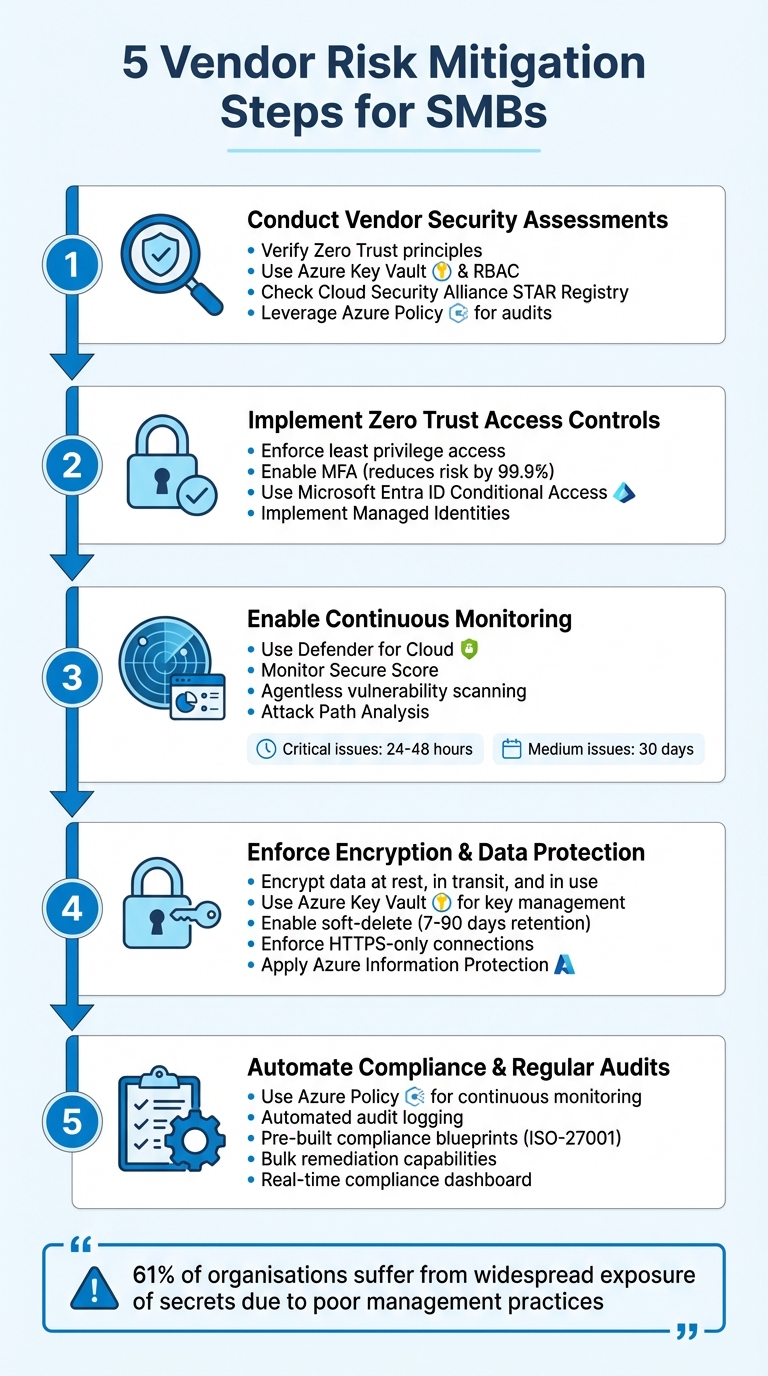
5 Vendor Risk Mitigation Steps for SMBs in Azure
Mastering Vendor Management | Cybersecurity Vendor Risk Management Training | TPRM
1. Conduct Vendor Security Assessments
Before allowing vendors access to your systems, it's crucial to ensure they adhere to strong security standards. With Azure-native tools and widely available industry resources, you can simplify this process without needing external auditors or overly complex frameworks. The next step is to evaluate how well these practices can mitigate risks.
Effectiveness in Reducing Vendor Risks
To minimise vendor-related risks, confirm they follow Zero Trust principles. This includes verifying explicit access, enforcing least privilege, and operating under the assumption of a potential breach. For multitenant SaaS solutions, vendors should:
- Isolate data using separate Azure Key Vaults.
- Use modern Azure Role-Based Access Control (RBAC) instead of outdated policies.
- Implement Just-In-Time (JIT) roles with Multi-Factor Authentication (MFA) for administrative tasks.
Relevance to SMBs Using Azure
For small and medium-sized businesses (SMBs), sticking to security basics is a good starting point. From there, assessments can be simplified further with Azure's built-in tools and external resources. For example:
- Use the Cloud Security Alliance STAR Registry to check vendors' Level 1 Self-Assessments or Level 2 Certifications.
- Review Consensus Assessments Initiative Questionnaire (CAIQ) reports for detailed insights.
- Rely on Azure Policy to audit and enforce secure configurations, such as requiring Managed Identities and activating Defender for Key Vault alerts.
Ease of Implementation for Small IT Teams
For small IT teams, automation can make vendor assessments much more manageable. Here's how Azure can help:
- Azure Advisor provides free, actionable security recommendations.
- Defender for Cloud (free tier) offers continuous security monitoring.
- Managed Identities simplify authentication processes, reducing the workload for your team.
2. Implement Zero Trust Access Controls
Once you've completed vendor security assessments, the next step is to manage vendor access using Zero Trust principles. According to Microsoft, "Zero Trust is a security strategy that assumes breach and verifies each request as though it originated from an uncontrolled network". In simpler terms, every vendor connection is treated as if it could be compromised. Combining Zero Trust controls with vendor assessments adds an extra layer of defence to your Azure environment.
How Zero Trust Reduces Vendor Risks
Zero Trust revolves around three key principles that tackle vendor risks head-on:
- Explicit verification: Every access request is validated using signals like location, device health, and risk level.
- Least privilege access: Vendor permissions are limited to what’s strictly necessary, ensuring they only access what they need.
- Assume breach: Access is segmented to contain the damage if a vendor account is compromised.
Tools like Microsoft Entra ID's Conditional Access make this process seamless. For instance, if a vendor logs in from an unexpected location or uses a device flagged as insecure, access can be denied or additional verification steps can be triggered automatically.
Why This Matters for SMBs Using Azure
For small and medium-sized businesses (SMBs), where identity has become the main security boundary, Zero Trust is crucial. Enabling multi-factor authentication (MFA), for example, reduces account compromise risks by an impressive 99.9%. With Microsoft Entra Security Defaults, SMBs can implement MFA at no extra cost. These defaults also block outdated authentication methods, strengthening overall security.
Features like Managed Identities remove the need for vendors to handle passwords or store credentials, significantly lowering the risk of credential theft. Similarly, Privileged Identity Management (PIM) ensures that administrative rights are granted only when needed and for short durations, reducing the likelihood of misuse or exploitation.
Simple Setup for Small IT Teams
For smaller IT teams, implementing Security Defaults is as easy as a single click, providing immediate MFA protection across all accounts. Another straightforward measure is enabling Resource Locks, which prevent vendors from accidentally or intentionally deleting critical infrastructure, such as virtual networks or Recovery Services vaults. These locks are easy to configure and can safeguard against major disruptions.
For teams looking to adopt more advanced controls, Conditional Access requires Microsoft Entra ID P1 licensing, while risk-based automation features need P2 licensing. Additionally, many Zero Trust tools - like DDoS Protection, Azure Firewall threat intelligence, and Web Application Firewall (WAF) default rules - are cost-effective and have minimal impact on users.
3. Enable Continuous Monitoring with Defender for Cloud
Once you've implemented Zero Trust, keeping an eye on vendor activity in your Azure environment becomes crucial. Defender for Cloud offers real-time monitoring and vulnerability detection, helping you identify risks before they grow into larger issues. It complements Zero Trust by quickly spotting vendor misconfigurations and addressing them.
Effectiveness in Reducing Vendor Risks
Defender for Cloud evaluates your Azure resources using the Microsoft Cloud Security Benchmark and assigns a Secure Score to highlight risk levels. This is especially useful for monitoring vendor access. For example, it can detect vulnerabilities in vendor-deployed virtual machines (VMs) or flag when their configurations deviate from your established security standards.
The platform's agentless scanning makes it easy to uncover vulnerabilities in VMs and containers without the need for additional installations or affecting system performance. Imagine a vendor deploying a VM from the Azure Marketplace - Defender for Cloud's built-in vulnerability scanner can automatically spot outdated software or missing patches that could be exploited.
With Attack Path Analysis, you can see how a small misconfiguration in a vendor-facing resource might escalate into a significant security breach. The tool prioritises vulnerabilities based on factors like business impact, resource importance, and exposure to the internet.
Relevance to SMBs Using Azure
Defender for Cloud’s Cloud Security Posture Management (CSPM) features are enabled automatically the first time you access it in the Azure portal. This means small and medium-sized businesses (SMBs) can instantly benefit from security recommendations and the Secure Score without incurring extra costs.
While CSPM capabilities are free, the paid version offers additional tools like attack path analysis and regulatory compliance monitoring, which are invaluable for managing third-party risks. Plus, Microsoft provides a 30-day free trial for most paid plans, giving you a chance to explore these advanced features before making a commitment.
Ease of Implementation for Small IT Teams
Getting started is straightforward. Basic setup takes about 10 minutes, and enabling paid features is as simple as toggling a setting in the Environment settings menu. The platform even auto-installs the necessary security agents and can send email alerts for high-severity vulnerabilities, making it easier for small teams to stay on top of issues.
"Proactive identification ensures that issues are tackled as they arise, maintaining a manageable, prioritised backlog of remediation tasks." – giulioastori, Microsoft
For critical vulnerabilities (rated CVSS 9.0–10.0), aim to resolve them within 24–48 hours, while medium-severity issues can be addressed within 30 days. This timeline helps keep your environment secure without overwhelming your team.
4. Enforce Encryption and Data Protection Policies
Once continuous monitoring is in place, the next priority is ensuring that sensitive data shared with vendors stays secure. Encryption plays a key role here - by making data unreadable without the correct keys, it adds an extra layer of protection even if a breach occurs. Azure simplifies this process with built-in encryption options for various data states, enabling small businesses to protect their information without needing elaborate configurations. This approach works hand-in-hand with monitoring efforts to maintain data integrity throughout its lifecycle.
Effectiveness in Reducing Vendor Risks
Encryption strengthens your defences by securing data at every stage. Azure safeguards data in three critical states: at rest (stored on physical devices), in transit (travelling across networks), and in use (processed in memory). For example, Azure Storage and Azure SQL Database automatically encrypt data at rest, helping to minimise the risk of vendor-related breaches.
When it comes to sharing documents and emails with external vendors, Azure Information Protection (AIP) ensures persistent encryption that stays with the file. This guarantees that only authorised users can access the data, even if it is forwarded or shared outside your organisation. For instance, you can label sensitive files as "highly confidential" to restrict actions like forwarding or printing to authorised personnel only.
Additionally, Azure Key Vault gives you centralised control over encryption keys, ensuring they remain under your management rather than being handled by vendors.
Relevance to SMBs Using Azure
Azure's default encryption settings are particularly beneficial for small businesses, as they eliminate the need for complex security configurations. For example, data at rest is encrypted automatically, and you can use Azure Policy to enforce HTTPS-only connections, ensuring data in transit is protected.
Key Vault also offers features like soft-delete, allowing recovery of deleted encryption keys within a retention period of 7 to 90 days. Combined with purge protection, this prevents both accidental and malicious permanent deletion of keys. These safeguards are especially useful when working with third-party vendors who might have temporary access to your systems.
Ease of Implementation for Small IT Teams
Azure's robust default settings make it straightforward for small teams to enforce encryption and data protection policies. Features like soft-delete, purge protection, and automatic key rotation can be enabled directly through the Azure portal. Meanwhile, Azure Policy ensures secure configurations are automatically audited and enforced, such as requiring HTTPS for storage accounts or enabling disk encryption across your environment.
To manage vendor access to sensitive keys, you can implement just-in-time (JIT) access through Privileged Identity Management (PIM) using Azure Role-Based Access Control (RBAC). This method avoids granting permanent permissions, instead limiting access to only what is needed, when it is needed. For optimal security, small teams should also enforce TLS 1.2 or 1.3 for all service endpoints, ensuring robust protection for data in transit.
5. Automate Compliance and Regular Audits
Wrap up your security strategy by incorporating automation to maintain consistent compliance. After implementing encryption and continuous monitoring, automation helps keep your security measures intact over time. Manual audits can often lead to delayed detection of configuration changes made by vendors. This is where Azure Policy comes in - it continuously monitors your environment and flags any deviations from your security baseline automatically, eliminating the need for constant manual checks.
Effectiveness in Reducing Vendor Risks
Automation plays a critical role in minimising vendor-related security risks. By ensuring consistent security settings, it significantly reduces the potential damage caused by security incidents. For example, Azure Policy can automatically audit Key Vaults and manage key rotation, limiting the opportunities for attackers to exploit vulnerabilities. Additionally, automated audit logging keeps track of every vendor operation, providing a clear trail for forensic analysis if any suspicious activity is detected. On top of that, Microsoft Defender for Key Vault offers real-time threat detection, sending immediate alerts for unusual access patterns that could signal a compromised vendor account.
Relevance to SMBs Using Azure
For small and medium-sized businesses (SMBs) in the UK, especially those adhering to UK GDPR regulations, Azure's built-in compliance tools are a game-changer. The Information Commissioner's Office (ICO) requires businesses to provide documented proof that their vendors uphold strong security standards. Automation simplifies this process by generating the necessary evidence without requiring extensive manual documentation. With pre-defined blueprints for standards like ISO-27001, Azure enables SMBs to meet complex regulatory demands without the need for a dedicated compliance team.
Microsoft’s commitment to security is evident in its annual investment of over £800 million in cybersecurity research and its team of more than 3,500 security experts. SMBs can tap into these resources through Azure’s built-in features. Plus, tools like Azure Policy and Azure Blueprints come at no extra cost for Azure subscribers. These automated solutions integrate effortlessly with existing encryption, access control, and monitoring strategies, creating a comprehensive framework for managing vendor risks.
Ease of Implementation for Small IT Teams
Azure’s automation tools are designed with small IT teams in mind, making them accessible and easy to use. Teams can get started right away by using Azure’s library of pre-built policy definitions, avoiding the hassle of creating custom code. A centralised compliance dashboard consolidates all compliance information into one place, dramatically reducing the time needed for audits. For non-compliant resources, Azure allows bulk remediation through its portal, enabling teams to fix multiple configuration errors simultaneously rather than addressing them one by one.
To prevent compliance issues before they arise, you can integrate Azure Policy into your deployment pipelines. This ensures compliance checks are performed during the deployment process, blocking non-compliant builds before they go live. Additionally, automated data recovery features can be configured for critical resources, and Azure Event Grid can send real-time notifications whenever vendors make changes to keys or certificates. These tools help small IT teams maintain a strong security posture with minimal effort.
Conclusion
Managing vendor risks doesn’t have to overwhelm small IT teams. By focusing on five key steps - conducting security assessments, enforcing Zero Trust principles, implementing continuous monitoring, encrypting data, and automating compliance - you can build a robust defence system that aligns with Azure's shared responsibility model. As Wiz highlights, "Understanding your responsibilities versus Microsoft's is crucial for effective risk management". Together, these measures create a well-rounded strategy to strengthen security and minimise overlapping vulnerabilities.
These efforts go beyond just ticking security boxes. Consider this: 61% of organisations suffer from widespread exposure of secrets due to poor management practices. By automating processes, you significantly reduce the risk of becoming part of that statistic. Tools like Compliance Manager can also provide a real-time compliance score, making it easier to demonstrate adherence to UK GDPR requirements to the ICO and other regulators - without getting buried in administrative tasks.
Vendor risk mitigation requires constant attention as both threats and your Azure environment evolve. This dynamic approach reflects the challenges discussed earlier. For example, using Shared Access Signatures (SAS) allows you to grant vendors time-limited, specific access instead of overly broad permissions. Regularly reviewing third-party audits through the Service Trust Portal and configuring autorotation for cryptographic assets can further enhance security. Additionally, implementing Just-In-Time access with Privileged Identity Management ensures that even if vendor credentials are compromised, attackers have minimal opportunity to exploit them. Each of these actions contributes to maintaining a secure and efficient Azure environment for SMBs.
For more practical advice on improving your Azure environment, visit Azure Optimisation Tips, Costs & Best Practices. This resource offers guidance on balancing cost efficiency with security and strategies for safely scaling your cloud infrastructure. With Azure operating in 54 regions and holding over 100 compliance certifications, staying informed helps you take full advantage of Azure's capabilities while safeguarding your business against vendor risks.
FAQs
What’s the fastest way to limit vendor access in Azure?
The fastest way to limit vendor access in Azure is through Role-Based Access Control (RBAC). By assigning the minimum necessary permissions at the most specific scope, you ensure users can only perform the tasks they absolutely need. This reduces unnecessary access and helps maintain a secure environment.
Which Azure tools should I enable first to monitor vendors?
Azure Cost Management is your go-to tool for keeping a close eye on expenses. It not only helps track spending but also provides insights that are crucial for reducing vendor risks. By understanding where your money goes, you can make smarter decisions and spot potential issues early.
Use Azure Monitor for Compliance
Once your costs are under control, it’s time to focus on resource compliance. Azure Monitor is perfect for this. It keeps an eye on your resources, ensuring they align with your organisation's standards and policies. It's like having a watchful eye over your infrastructure.
Address Security with Azure Policy
Security risks tied to vendors can be a headache, but Azure Policy has you covered. This tool helps you enforce rules and address vulnerabilities, ensuring your vendors meet your security requirements.
Together, these tools - Azure Cost Management, Azure Monitor, and Azure Policy - offer a comprehensive way to monitor and manage your resources effectively.
How do I prove vendor security compliance for UK GDPR audits?
To prepare for UK GDPR audits and demonstrate vendor security compliance, it's crucial to maintain detailed records. This includes documentation of vendor certifications, encryption methods, incident response procedures, and audit trails. Tools like Azure Policy and Azure's auditing features can simplify this process. They allow you to manage compliance requirements effectively, streamline documentation, and provide the necessary evidence during audits.