
Scaling with Azure Load Balancer: Cost-Saving Strategies
Cut Load Balancer bills with practical tactics: consolidate instances, use autoscaling and private connectivity, reduce data transfer and automate cost monitoring.

Azure Load Balancer is a critical tool for distributing traffic across resources, offering reliability and scalability for businesses. However, managing costs effectively is a challenge, especially with the retirement of the Basic tier in September 2025. Here's how to reduce expenses and optimise usage:
- Understand Pricing: Standard Load Balancer charges £0.025/hour for the first five rules, £0.01/hour for additional rules, and £0.005/GB for data processing.
- Consolidate Resources: Combine multiple load balancers into one to avoid duplicate charges.
- Optimise Usage: Use Azure Automation to scale down non-production resources during off-peak hours.
- Leverage Autoscaling: Link Load Balancer with VM Scale Sets to adjust backend instances based on demand.
- Reduce Network Costs: Use Azure CDN to cut traffic fees and avoid cross-region transfers.
- Private Connectivity: Internal Load Balancers and private endpoints help minimise outbound bandwidth costs.
- Monitor and Automate: Use Azure Cost Management tools for real-time spending insights and automate resource configurations to prevent waste.
Azure Load Balancers Pricing Discussion
How Azure Load Balancer Pricing Works
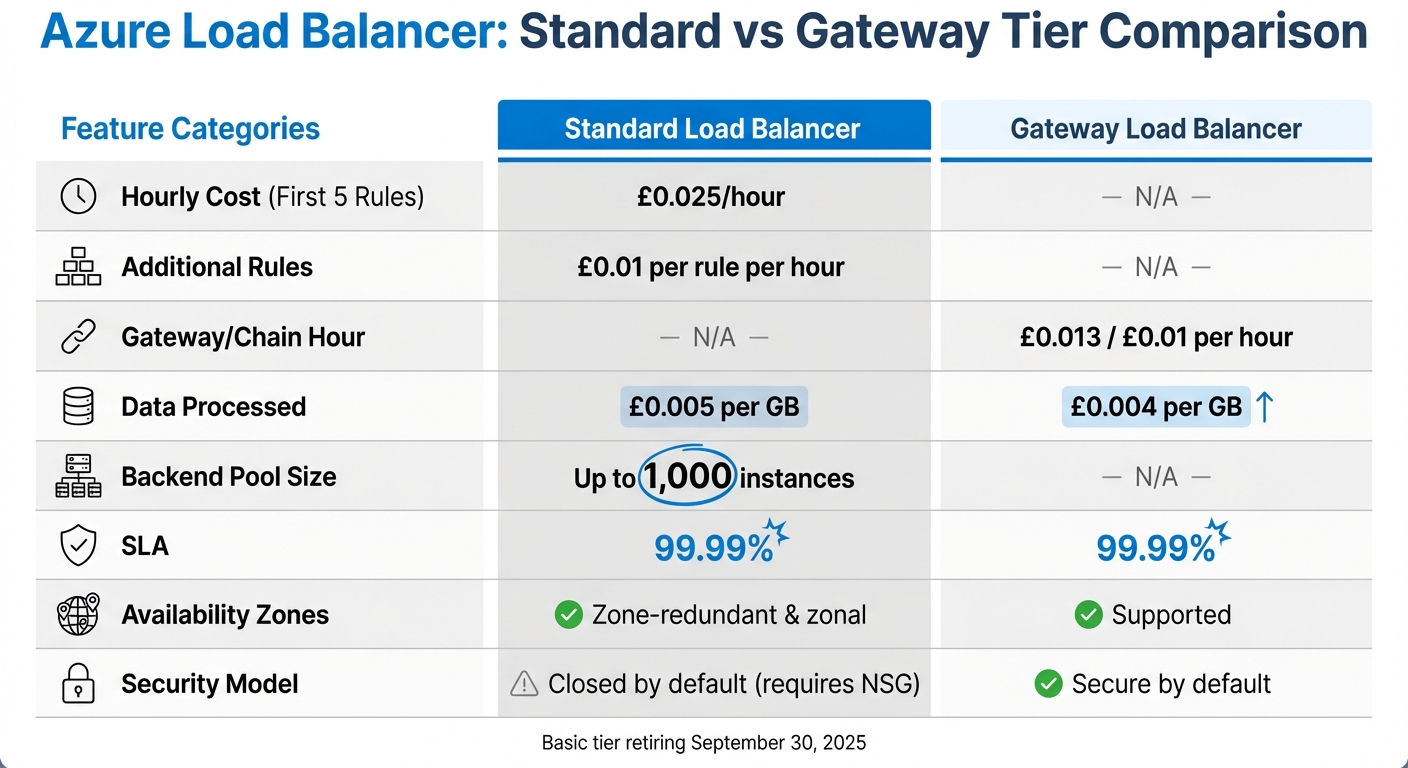
Azure Load Balancer Tier Comparison: Standard vs Gateway Pricing and Features
Azure Load Balancer pricing is determined by the number of rules and the amount of data processed. For the Standard SKU - set to replace the Basic tier after its retirement on 30 September 2025 - the first five load-balancing and outbound rules cost £0.025 per hour, with any additional rules charged at £0.01 per hour. Inbound NAT rules, however, remain free of charge.
Data processing fees for the Standard tier are billed at £0.005 per GB. This applies to all traffic handled by the load balancer, including data exchanged between virtual machines within the same Virtual Network and traffic directed to Azure PaaS endpoints. It’s worth noting that these fees are separate from Azure’s standard bandwidth charges for data leaving its data centres. Additionally, any partial hours are rounded up and billed as full hours.
Understanding these pricing fundamentals can help you uncover ways to optimise costs.
Load Balancer Tiers and Their Costs
Building on the basic pricing structure, Azure offers distinct tiers with different features and costs.
The Standard Load Balancer supports up to 1,000 backend instances and guarantees 99.99% uptime, making it suitable for both public-facing and internal traffic at Layer 4. Pricing starts at £0.025 per hour for the first five rules, with a data processing fee of £0.005 per GB.
Meanwhile, the Gateway Load Balancer is designed to scale third-party Network Virtual Appliances, such as firewalls or deep packet inspection tools. This tier is priced at £0.013 per gateway hour, £0.01 per chain hour, and has a slightly lower data processing fee of £0.004 per GB.
The now-retired Basic tier lacked a Service Level Agreement and capped backend pools at 300 instances. Users of the Basic tier must migrate to the Standard tier by September 2025 to maintain support and security.
Hidden Costs You Should Be Aware Of
There are additional costs that may not be immediately obvious. For instance, cross-zone traffic between Availability Zones incurs extra fees. Additionally, deploying a Standard Load Balancer without any rules still leads to charges for the associated Standard SKU Public IP address. Billing begins as soon as a rule is added, even if no traffic flows through the load balancer.
Microsoft’s documentation clarifies: "In addition to Load Balancer Data Processed charges, Bandwidth charges are also applicable.". This means outbound data may incur both load balancer processing fees and Azure bandwidth charges. Furthermore, integrating Azure Monitor with the load balancer can lead to additional costs for storage or data ingestion.
Tier Comparison: Costs vs Features
The table below highlights the key differences between the Standard and Gateway tiers, helping businesses weigh the trade-offs between cost and functionality:
| Feature | Standard Load Balancer | Gateway Load Balancer |
|---|---|---|
| Hourly Cost (First 5 Rules) | £0.025/hour | N/A |
| Additional Rules | £0.01 per rule per hour | N/A |
| Gateway/Chain Hour | N/A | £0.013 / £0.01 per hour |
| Data Processed | £0.005 per GB | £0.004 per GB |
| Backend Pool Size | Up to 1,000 instances | N/A |
| SLA | 99.99% | 99.99% |
| Availability Zones | Zone-redundant & zonal | Supported |
| Security Model | Closed by default (requires NSG) | Secure by default |
The Standard Load Balancer is a solid choice for most small and medium-sized businesses requiring high availability and low latency. On the other hand, the Gateway Load Balancer is better suited for scenarios involving advanced security appliances. For organisations handling large amounts of traffic, the data processing fee can quickly become the most substantial expense, making it crucial to monitor usage with Azure Cost Management tools.
How to Reduce Load Balancer Costs
To cut down on your monthly load balancer expenses, consider consolidating resources, optimising usage, and automating capacity adjustments. These practical strategies can help you manage costs effectively while maintaining performance.
Combine Multiple Load Balancers
Running a separate load balancer for every application can get expensive fast. For example, operating three instances costs £0.075 per hour, translating to £54.75 per month - even before factoring in data processing fees. Instead, you can consolidate services under a single load balancer. By assigning distinct frontend IPs or ports, you avoid duplicate charges and pay just £0.01 per hour for each additional rule. This method aligns with the tier-based pricing structure and significantly reduces costs.
Beyond savings, this approach simplifies operations. Managing one load balancer with clearly defined rules is far easier than juggling multiple instances. Tools like Azure Advisor can pinpoint underutilised load balancers that are good candidates for consolidation. Additionally, inbound NAT rules are free and don't count towards the five-rule billing threshold, making them an efficient way to manage administrative access to backend VMs.
Use Resources More Efficiently
Efficient resource use is another key to lowering costs. For example, you can scale down non-production VMs during off-peak hours by scheduling start/stop actions with Azure Automation. Since load balancers don’t charge for deallocated backend instances, you’ll only pay for the rules and minimal data processing during downtime.
To avoid unnecessary cross-zone data transfer fees, keep backend resources in the same availability zone as the load balancer. Azure Advisor can help you spot backend instances with very low utilisation - such as less than 3% P95 CPU usage or 2% average CPU over three days - so you can shut them down or resize them as needed. For workloads that don’t require constant availability, switching to B-series burstable VMs can further reduce compute costs without affecting the load balancer’s performance.
Set Up Autoscaling
Autoscaling is a smart way to pay only for what you need. By linking a Standard Load Balancer with Virtual Machine Scale Sets (VMSS), Azure can dynamically adjust backend instances based on real-time demand. This eliminates the waste of over-provisioned infrastructure and can save you money during periods of low traffic.
Azure Advisor prioritises recommendations to adjust instance counts over changing SKUs, as scaling in or out is quicker and offers immediate cost reductions. Keep an eye on CPU and network metrics to fine-tune scaling decisions and ensure your performance remains strong while optimising costs.
Cut Network Traffic and Data Transfer Costs
Network traffic charges can add up quickly and become a major expense, especially when data moves between regions or exits to the internet. For example, Standard Load Balancers cost £0.005 per GB of data processed, while outbound data transfer (egress) starts at approximately £0.087 per GB for the first 10TB. These costs can escalate for data-heavy applications, and many businesses - particularly small and medium-sized ones - often overlook them during setup. In fact, around 91% of organisations admit to wasting money in the cloud due to hidden costs like bandwidth. Here are some strategies to help manage and reduce these network traffic expenses.
Offload Traffic with Azure CDN
Using Azure Content Delivery Network (CDN) can significantly reduce traffic costs. By caching frequently accessed content at edge locations closer to users, fewer requests are routed through the load balancer. This setup not only lowers data processing fees but also eases backend scaling demands.
Take the example of a global media company: they used Azure Front Door for load balancing and set autoscaling policies based on CDN request and cache hit rates. This helped them cut infrastructure costs and improve latency for users worldwide.
To maximise savings, monitor your cache hit ratios with Azure Monitor. Higher hit rates mean less traffic hits the load balancer, reducing fees. For data that's rarely accessed, pairing CDN with Azure Blob Storage's "Cool" or "Archive" tiers can further lower costs while maintaining availability.
Avoid Cross-Region and Cross-Zone Transfers
Misconfigurations involving regions and zones can drive up network traffic costs unnecessarily. Keeping workloads within a single region can help you avoid steep inter-region transfer fees.
"Azure can be a beast. If you don't have the skills, it's easy to miss things like bandwidth or backup costs, which can spiral out of control." – Matt, Consultant, Synextra
Switching from Geo-Redundant Storage (GRS) to Locally Redundant Storage (LRS) is another way to cut costs. GRS backup storage is about 2.5 times more expensive than LRS due to replication transfer charges. Regularly using Azure Cost Management can help identify misconfigurations that might be unnecessarily increasing cross-region traffic.
Choose the Right Data Transfer Method
For internal application tiers, such as databases or middleware, consider using an Internal Load Balancer with private IPs. This keeps traffic within Azure's network and avoids public internet egress fees. Additionally, applying Azure Policy to block unnecessary public IPs ensures traffic stays on private routes, reducing bandwidth costs.
For multi-region setups, keep in mind that the Global Tier Load Balancer doesn’t add extra processing charges for packets routed from the Global tier to the Regional tier. However, standard bandwidth charges still apply for data leaving Azure data centres.
"It's generally cheaper for egress data to be routed via the public internet." – Marc Kean, Former Employee, Microsoft
When routing egress traffic, selecting the public internet as the preferred option can often lower costs. To further optimise, use outbound rules with manual port allocation to avoid SNAT port exhaustion, which can lead to expensive retries and connection failures.
Private Connectivity and Internal Routing Options
When it comes to cutting costs and managing traffic more efficiently, private connectivity stands out as a smart choice. By keeping traffic within Azure's network, it not only reduces expenses but also boosts security. For example, Internal Load Balancers handle traffic between virtual machines in private virtual networks, enabling secure, multi-tiered applications without adding extra charges.
Why Private Endpoints Save Money
Using Azure's private network for traffic eliminates outbound bandwidth costs entirely. If you access Private Endpoints via peered virtual networks, you'll only incur Private Link charges, bypassing the usual VNet peering fees. Additionally, Internal Load Balancers only charge for inbound data processing, as return traffic flows directly back to the source virtual machine without extra fees.
"Standard Load Balancer provides significant improvements including high performance, ultra-low latency, security by default, and SLA of 99.99% availability." – Microsoft
To save even more, regularly review and consolidate your internal load balancing rules to avoid unnecessary hourly charges. Using Azure Policy to block public IPs on network interfaces ensures traffic remains on private routes, further reducing costs.
This focus on optimising internal traffic naturally leads to exploring advanced routing options.
Service Mesh for Internal Traffic
When managing north–south traffic that involves Network Virtual Appliances (NVAs), the Gateway Load Balancer offers a simpler and more efficient solution compared to dual-load balancer setups. It eliminates the complexity of User-Defined Routes (UDRs) while maintaining flow symmetry, which reduces management headaches. Pricing for the Gateway Load Balancer includes approximately £0.010 per hour for the gateway and £0.003 per GB of processed data, which is slightly less than the Standard Load Balancer's £0.004 per GB.
To maintain security and avoid unauthorised charges, always apply Network Security Groups (NSGs) to subnets or network interfaces. This ensures only permitted traffic flows through private routes.
For more ways to optimise Azure costs, check out Azure Optimization Tips, Costs & Best Practices.
Monitor and Automate for Better Cost Control
Keeping cloud expenses in check requires constant attention. Idle resources and overlooked settings can quietly siphon funds from your budget. Microsoft highlights this clearly:
"Cost management is an organizational problem and should be an ongoing practice that begins before you spend money on cloud resources".
Use Azure Cost Management Tools
Azure Cost Management offers a detailed view of your spending, breaking it down by subscription, resource group, or tag. This makes it easier to identify where costs, such as those from Load Balancers, are piling up [9, 29]. The platform updates cost data every four hours, giving you near real-time insights into your spending trends. Additionally, Azure Advisor can help you spot "zombie" resources, like Standard Load Balancers with empty backend pools that still rack up hourly charges despite not handling any traffic. Use the 'Quick Fix' feature to clean up unattached public IPs or idle Load Balancers.
To keep spending under control, you can set up budgets based on cost or usage. Automated alerts via Action Groups will notify stakeholders before expenses exceed predefined limits. Enforcing tagging with Azure Policy allows you to allocate Load Balancer costs to specific departments or projects, ensuring every penny is accounted for. For smoother monthly reviews, you can schedule automated billing exports using the Exports API.
Once you’ve gained visibility into your costs, automating resource configurations can help eliminate waste and prevent costly errors.
Automate Resource Setup
Manually setting up resources often leads to mistakes and unused components that inflate costs. By using Infrastructure as Code (IaC), you can ensure consistent, cost-efficient configurations across all deployments. Azure Policy can act as a safeguard, preventing the use of expensive SKUs or unnecessary public IP addresses, which can lead to high bandwidth charges [17, 27].
Automation can also optimise environment lifecycles. For instance, you can create preproduction and development environments only when needed and decommission them immediately after use. Configuring autoscaling ensures that resources are dynamically allocated or deallocated based on performance requirements, so you only pay for what you actually need [7, 27]. Additionally, automated audits can clean up unused load-balancing or outbound rules, further trimming unnecessary expenses [1, 32].
These automated processes lay the groundwork for adopting FinOps practices, which take cost management a step further.
Apply FinOps Methods
Building on automated resource management, FinOps principles help refine cost control even more. This approach shifts responsibility for cloud spending to workload teams while keeping central IT governance intact. FinOps follows four main stages: design (planning), provision (selection), monitor (tracking), and optimise (refining). To stay ahead of overspending, you can configure automated alerts in Microsoft Cost Management to notify stakeholders when spending reaches 50%, 75%, or 90% of the monthly budget [31, 32].
The "Cost" tab in Azure Advisor is another valuable tool for identifying idle resources, such as Load Balancers or ExpressRoute circuits, that can be decommissioned [16, 7]. For example, Azure Advisor flags resources for shutdown if their P95 maximum CPU utilisation is below 3% and outbound network usage is under 2% over a seven-day period. For non-production environments, tools like Azure Automation or Logic Apps can scale down or deprovision resources during off-hours, leading to noticeable savings.
For more tips on how to optimise your Azure spending, check out Azure Optimization Tips, Costs & Best Practices.
Conclusion: Cost-Saving Steps for SMBs
Reducing Azure Load Balancer expenses doesn’t require a drastic overhaul. By following the strategies discussed - such as consolidating resources, streamlining network traffic, using private connectivity, and automating cost monitoring - small and medium-sized businesses (SMBs) can achieve noticeable savings. With the Basic Load Balancer set to retire on 30th September 2025, transitioning to the Standard tier becomes an essential step towards cost-effective solutions.
Start with the basics: right-size your backend resources. Tools like Azure Advisor can help identify underutilised resources, such as those with CPU usage below 3%. Implement autoscaling to adjust resources based on demand, ensuring you only pay for what you actually use. Consolidating load balancers is another smart move, as it eliminates duplicate hourly charges.
Next, focus on network costs. Whenever possible, route egress traffic through your ISP’s network instead of Microsoft’s premium global network to lower bandwidth expenses. For internal traffic, stick to private networks and internal load balancers to avoid unnecessary public bandwidth charges.
Microsoft also stresses the importance of ongoing cost management. Use tools like Microsoft Cost Management to set budgets and alerts, helping you spot unusual spending patterns early. Regularly check Azure Advisor’s “Cost” tab to identify idle resources and clean up unused load-balancing rules.
To get the most out of these techniques, adopt them as part of a continuous improvement process. For more in-depth cost-saving tips, visit Azure Optimization Tips, Costs & Best Practices.
FAQs
How can I lower costs when using Azure Load Balancer?
To keep your Azure Load Balancer costs in check, think about using the Standard Load Balancer SKU. It often offers more cost-effective pricing for most use cases. Make sure to only set up the frontend IPs, rules, and health probes that your configuration truly needs. Also, clear out any unused or idle load balancers to avoid paying for resources you’re not using.
Simplify your NAT configurations wherever you can to make management easier and cut down on costs. Regularly check Azure Advisor for cost-saving tips and consider leveraging Azure Hybrid Benefit or reservation pricing to lower your pay-as-you-go expenses. These steps can help you manage your budget effectively without compromising on performance.
What does the retirement of the Basic tier mean for Azure Load Balancer users?
Azure's Basic Load Balancer is set to retire on 30 September 2025, which means users will need to transition to the Standard SKU to maintain uninterrupted service. The Standard SKU brings added capabilities like zone redundancy and private endpoints, but it operates under a different pricing model.
Failing to migrate before the retirement date could lead to service interruptions or loss of functionality for applications relying on the Basic tier. To prevent such issues, it's essential to prepare and complete the migration well ahead of time.
What unexpected costs should I be aware of when using Azure Load Balancer?
When working with Azure Load Balancer, unexpected expenses can crop up from various sources. Pricing is generally listed in US dollars and then converted to pounds sterling based on London spot rates. This means that fluctuations in exchange rates can lead to changes in the final cost. On top of that, data transfer fees can differ depending on the amount of traffic and the regions involved.
You might also face extra charges for resources outside the standard offering, such as public IP addresses, NAT rules, or any additional configurations tailored to your specific needs. To keep these costs under control, it’s a good idea to regularly review your Azure usage and fine-tune your setup to eliminate avoidable expenses.