
GDPR Backup Policy Checklist for SMBs
GDPR backup policy checklist for UK SMBs: document processing, set retention, encrypt backups, control access, test recovery and handle erasure requests.

If you're an SMB in the UK, GDPR compliance is non-negotiable - especially when it comes to backups. Protecting personal data isn't just about storing it; you need clear policies for retention, encryption, and recovery. Here's a quick breakdown:
- Document Everything: Maintain records of processing activities (RoPA) and lawful bases for backups.
- Retention Rules: Keep data only as long as necessary and automate deletion schedules.
- Data Security: Encrypt backups at rest and in transit; use role-based access controls (RBAC).
- Location Matters: Store data in GDPR-compliant regions and ensure third-party contracts meet legal standards.
- Test Regularly: Verify backups quarterly to ensure recovery aligns with your business needs.
- Right-to-Erasure: Be transparent about handling deletion requests, even for backup data.
With the Data (Use and Access) Act now effective, staying compliant also helps mitigate risks like ransomware attacks and hefty fines. Follow these steps to safeguard your business and customer trust.
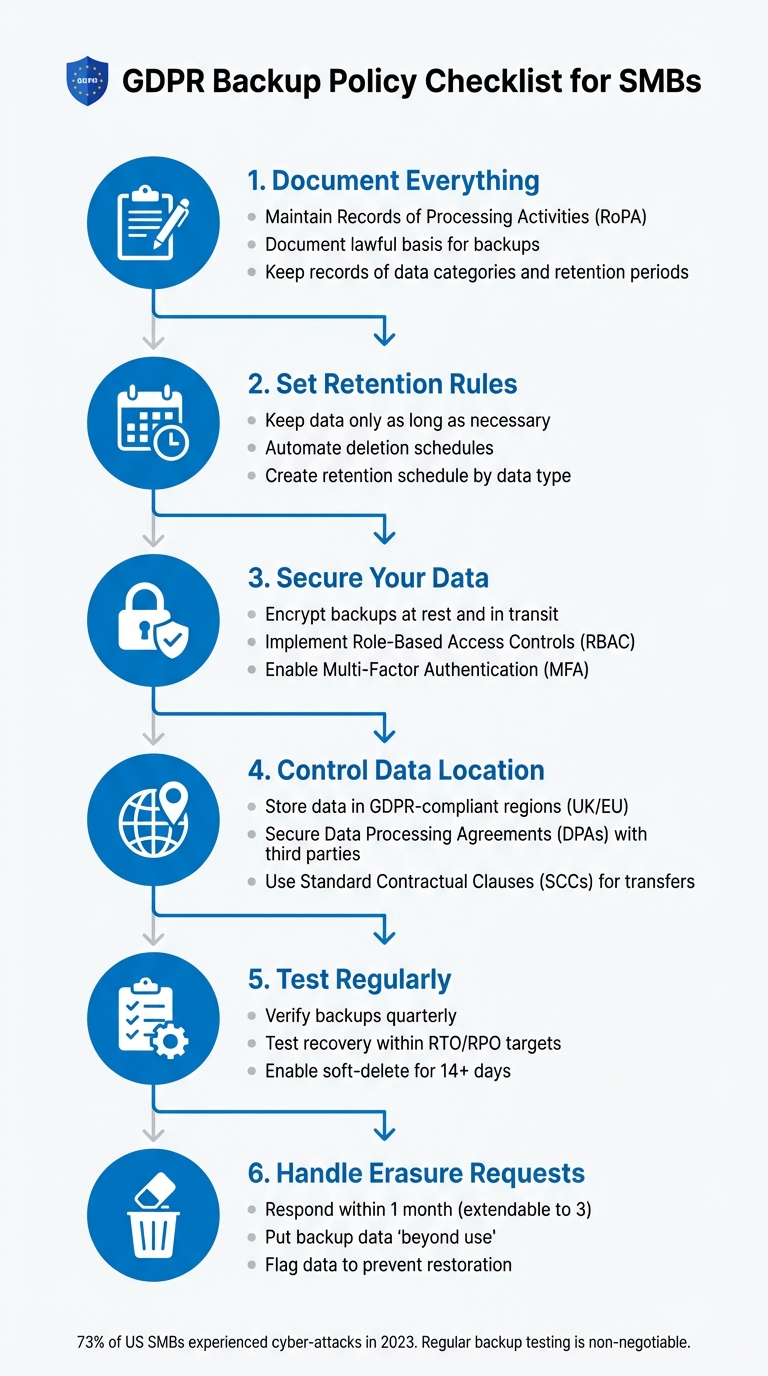
GDPR Backup Compliance Checklist for SMBs: 6 Essential Steps
Webinar - GDPR for Small and Medium-Sized Enterprises (SMEs)
Documentation Requirements
Proper documentation plays a key role in demonstrating compliance with GDPR and ensuring that your backup strategy aligns with regulatory expectations. According to Article 30 of the UK GDPR, small and medium-sized businesses (SMBs) are required to maintain written records of their data processing activities, which include backups. These Records of Processing Activities (RoPA) should outline critical details, such as the purpose of backing up data, the types of personal data stored, who has access to it, and how long the data will be retained. While this documentation is a legal obligation, it also supports better data governance and helps showcase compliance with broader GDPR requirements. Essentially, it forms the backbone of your GDPR backup compliance efforts.
For SMBs with fewer than 250 employees, full RoPA requirements might not apply. However, any processing involving high-risk data, regular activities, or special categories of information - like health records or criminal convictions - must still be documented. Clear and thorough records are especially important for identifying what needs protection, particularly as SMBs face increasing cybersecurity threats.
Document Your Lawful Basis for Data Backups
Every backup involving personal data must have a lawful basis for processing. While Article 30 doesn’t explicitly require you to document this basis, the Information Commissioner’s Office (ICO) strongly advises it as part of demonstrating accountability. Common lawful bases include meeting legal obligations (e.g., keeping tax records) or pursuing legitimate interests, such as safeguarding your business against data loss. If you rely on legitimate interests, make sure to document a balancing test that explains how your need to back up data outweighs potential privacy risks.
Start by conducting an information audit to identify what personal data you hold, where it is stored (including backups), and the reasons for its collection. Link each processing purpose to specific data categories and the individuals affected. For special category data - like employee health records or customer ethnic origins - you’ll also need to document the specific conditions under the Data Protection Act 2018 that allow for this processing.
Once your lawful basis is established, ensure that minimal data retention practices are in place to maintain GDPR compliance.
Define Data Minimisation and Retention Policies
Data minimisation - only collecting and storing what is strictly necessary - and storage limitation - keeping data only for as long as needed - are fundamental GDPR principles. Retention periods must be justifiable, and data should be deleted from backups once it is no longer required.
Develop a retention schedule that specifies data categories, retention timelines, and disposal methods, such as deletion or anonymisation, for when the retention period ends. Assign a team member to manage and regularly update this schedule. You might also consider automated tools to flag records nearing their retention limit.
| Documentation Component | What to Include | GDPR Requirement |
|---|---|---|
| Retention Schedule | Data categories, retention periods, disposal actions | Article 30 / Storage Limitation |
| Lawful Basis Record | Legal reason for processing backup data | Accountability Principle |
| Security Measures | Encryption, access controls, transfer safeguards | Article 32 |
| Special Category Justification | Conditions for processing sensitive data in backups | Data Protection Act 2018 |
Data Location and Transfer Controls
For small and medium-sized businesses (SMBs), managing where backup data is stored and transferred is essential to comply with GDPR. Even if you outsource to platforms like Microsoft Azure, the legal responsibility for compliance remains firmly on your shoulders. Failure to adhere to these regulations can lead to hefty penalties. A stark example of this is the 2015 data breach involving the Swedish National Transport Agency, which stemmed from a poorly managed outsourcing contract. This incident highlights the importance of verifying data residency clauses in contracts and maintaining oversight at all times.
The following steps focus on choosing compliant data centres and forming strong third-party agreements to ensure GDPR compliance.
Choose GDPR-Compliant Data Centres
When it comes to safeguarding personal data under GDPR, selecting data centres located within the UK or EU is a practical way to simplify compliance. These regions adhere to recognised data protection standards, offering an added layer of assurance. For SMBs using Microsoft Azure, the platform provides tools like Azure Policy and Azure Data Boundary to enforce geographic restrictions for data storage and processing.
- Azure Policy automates the enforcement of region-specific data residency rules.
- Azure Data Boundary ensures that data remains within designated European regions.
- The Microsoft Trust Centre offers transparency reports, detailing where your data is stored.
- Azure Resource Graph generates compliance reports, providing insights into the physical locations of your data.
It's also crucial to conduct thorough due diligence, such as site visits, system tests, and audit requests, to confirm that your chosen providers meet GDPR standards. Remember, under the shared responsibility model, the cloud provider supplies the tools, but it’s your job to configure and implement these geographic controls correctly.
Secure Third-Party Agreements
When working with cloud providers that handle personal data, having a written Data Processing Agreement (DPA) is non-negotiable under GDPR. These agreements should cover:
- The subject matter, duration, nature, and purpose of the data processing.
- Types of personal data involved and categories of data subjects.
- A clause ensuring the processor acts only on your documented instructions.
- Written approval requirements for sub-processors meeting GDPR standards.
- Safeguards for data transfers outside the UK or EU, such as International Data Transfer Agreements (IDTA) or Standard Contractual Clauses (SCCs).
- Explicit rights for audits and inspections.
- Clear definitions of shared responsibilities for security tasks like patching, firewalls, and backups.
- Detailed technical and organisational security measures.
- Support for data breach notifications and Data Protection Impact Assessments.
- Provisions for data deletion or return at the end of the contract, unless legal retention is required.
To stay on top of compliance, maintain a centralised log of all processor contracts and data-sharing agreements. This demonstrates accountability to regulators and ensures you’re prepared for changes in legislation, such as the Data (Use and Access) Act, coming into effect on 19 June 2025. Regularly review these agreements to keep them up to date.
Access Control and Security Measures
Managing who can access your backup systems is a cornerstone of GDPR compliance. Article 32 outlines the need for technical and organisational measures that ensure security proportionate to the risks involved. For small and medium-sized businesses (SMBs), this means protecting personal data in backups from both external threats and potential internal misuse. The stakes are high - failures in this area have led to devastating data losses in the past.
Two critical components for safeguarding backup access are role-based access controls and strong encryption.
Implement Role-Based Access Controls (RBAC)
Role-Based Access Controls (RBAC) let you assign permissions based on specific job roles, ensuring staff only access the backup functions they need. This approach, known as the principle of least privilege, helps prevent accidental errors and malicious actions. For SMBs using Microsoft Azure, there are three pre-defined roles that provide precise levels of control:
- Backup Reader: View-only access for monitoring purposes.
- Backup Operator: Can initiate backups and restores but cannot alter policies.
- Backup Contributor: Full management rights, including creating vaults and modifying policies.
By default, assign employees the Backup Reader role, and only grant higher permissions when there's a clear, documented need. To counteract risks posed by rogue administrators, enable Multi-User Authorisation (MUA). This feature requires a separate security administrator's approval before any destructive operations, like disabling soft-delete, can proceed. As noted by Microsoft:
"Multi-user authorisation helps protect against a rogue administrator performing destructive operations (that is, disabling soft-delete), by ensuring that every privileged/destructive operation is done only after getting approval from a security administrator".
Additional protective measures include enabling Just-In-Time access and requiring security PINs to further limit unauthorised access.
While RBAC controls access, encryption ensures data remains secure.
Encrypt Data at Rest and in Transit
Encrypting data both at rest and in transit is not just good practice - it’s a GDPR requirement under Article 32. Encryption acts as a safeguard, preventing misconfigurations from turning into full-scale breaches.
For data in transit (moving between systems), use protocols like HTTPS, SSL, or TLS to secure traffic and ensure it stays within private networks. For data at rest (stored data), your backup solution should automatically apply encryption using industry-standard algorithms. For example, Microsoft Azure encrypts all backup data by default, with key management handled through Azure Key Vault for added control.
To further enhance security, consider using private endpoints. These isolate backup traffic from the public internet, providing an additional barrier against data exfiltration attempts.
Retention and Deletion Protocols
The GDPR's storage limitation principle requires that personal data should only be kept for as long as it's needed for its intended purpose. For SMBs handling backups, this creates a challenge: you must retain data long enough to satisfy legal and business requirements while avoiding unnecessary risks. Alarmingly, up to 75% of over-retained records contain sensitive information, which increases the likelihood of compliance issues. Retention protocols, when combined with backup documentation and security measures, form a key part of a well-rounded compliance strategy.
To manage this effectively, automate retention policies for each type of data. Create a retention schedule that outlines each data type, its purpose, and the appropriate retention period. For example, regulatory requirements may dictate specific retention periods: HIPAA-regulated health records must be kept for at least six years, while SOX-regulated financial records require a minimum of seven years. Other data types, however, might only need to be retained for shorter durations based on business needs. Justify every retention period in line with your legal and operational responsibilities.
Automate Retention Policies by Data Type
Manually deleting data isn't practical - it’s time-consuming and prone to mistakes. Instead, use automated systems to review and delete records after their retention periods expire. These periods should align with the relevant regulations. While GDPR doesn’t specify exact timeframes, it does mandate that data should not be retained "longer than necessary" for its intended purpose. Regularly review and update your retention policies to ensure they remain effective as your business needs evolve.
Process Right-to-Erasure Requests
Under GDPR, individuals have the right to request the deletion of their personal data, and organisations typically have one month to respond. For more complex cases, this timeframe can be extended to three months. However, backup systems are not designed for precise single-record deletions, which can make compliance challenging.
The Information Commissioner's Office (ICO) offers a practical approach: place the backup data "beyond use." According to the ICO:
"The key issue is to put the backup data 'beyond use', even if it cannot be immediately overwritten. You must ensure that you do not use the data within the backup for any other purpose."
In practice, this means removing the data from live systems immediately upon receiving a valid erasure request and flagging the corresponding backup data to prevent restoration. The flagged data will remain in the backup until it is naturally overwritten as part of your rotation schedule. Be transparent with the individual about how their data will be handled and when it will be permanently deleted.
It's important to note that the right to erasure is not absolute. Requests can be denied if the data is needed to meet legal obligations, exercise official authority, or defend against legal claims. If you choose to decline a request, document your decision and the reasoning behind it carefully.
Backup Testing and Recovery Procedures
The true measure of a backup lies in its ability to enable successful recovery. Under GDPR, systems must maintain confidentiality, integrity, availability, and resilience. This makes regular backup testing a non-negotiable requirement. Unfortunately, many small and medium-sized businesses (SMBs) only discover backup issues when disaster strikes. Considering that 73% of US SMBs reported experiencing a cyber-attack in 2023, the risks of neglecting recovery readiness are simply too high.
In the UK, the Data (Use and Access) Act, enacted on 19 June 2025, underscores the importance of robust Business Continuity Plans (BCPs) and Disaster Recovery Plans (DRPs). Recovery protocols must prioritise identifying critical records and ensure that backup configurations align with your Recovery Time Objectives (RTO) and Recovery Point Objectives (RPO). It’s equally important that your team understands these plans, can explain them clearly, and demonstrate their effectiveness. Once critical records and recovery objectives are established, the next step is to verify backup functionality through thorough and systematic testing.
Test and Validate Backups Regularly
Documented policies and well-defined retention protocols are just the beginning. Regular testing is essential to confirm that your backups are reliable. While performing a full recovery test every time may not be practical, a clear testing strategy is vital. This strategy should outline the scope, frequency, and methods of testing. At a minimum, aim for quarterly recovery drills to ensure data integrity and assess staff preparedness. These drills should prove that your backups can be restored within your RTO and that the recovered data meets your RPO requirements.
To streamline this process, consider automating backup monitoring. Use centralised tools to track the health of your backups and receive alerts for failed jobs or unauthorised configuration changes. Additionally, enable "soft delete" features, which retain deleted backup data for at least 14 days. This safety net can help prevent minor errors from escalating into major compliance issues.
Establish Ransomware-Resilient Backups
Beyond regular testing, it’s crucial to ensure your backups are protected against ransomware attacks. The National Cyber Security Centre (NCSC) highlights the importance of backups in recovering from ransomware incidents:
"Making regular backups is the most effective way to recover from a destructive ransomware attack, where an attacker's aim is to destroy or erase a victim's data".
The Information Commissioner's Office (ICO) reported a consistent rise in personal data breaches caused by ransomware during 2020/2021.
To safeguard your backups, use offline or air-gapped solutions to keep them isolated from your production network. Strengthen security with granular access controls, such as Role-Based Access Control (RBAC) and Multi-Factor Authentication (MFA), and implement "Just-In-Time" access to minimise the exposure of administrative accounts.
The ICO has made its stance clear:
"The ICO does not consider the payment of a ransom as an 'appropriate measure' to restore personal data".
Your recovery plan should never depend on paying attackers. Instead, validate the integrity of immutable backups and off-site copies regularly to ensure they remain secure against destructive threats. For additional support, the NCSC provides a free tool called "Exercise in a Box", designed to help SMBs practise their ransomware response in a controlled environment.
Monitoring and Compliance Audits
Once you’ve established regular backup tests, it’s essential to maintain continuous monitoring and auditing to ensure compliance remains intact. This is particularly crucial for keeping your backup policies aligned with GDPR requirements. Without proper oversight, unauthorised changes or policy violations could slip through unnoticed, leading to costly missteps or breaches. Staying vigilant with monitoring helps you detect and address misconfigurations early.
Compliance isn’t something you can set and forget - it’s an ongoing effort. Automating alerts for failed backups, critical incidents, and budget thresholds (e.g., 90%, 100%, and 110% of your target budget) can help catch unusual activity before it escalates. Monitoring daily costs and metered data usage can also reveal unexpected spikes or drops, which might indicate misconfigurations or security concerns. Assigning a Directly Responsible Individual (DRI) to each backup resource ensures accountability, making it easier to manage and optimise your systems. These monitoring practices work hand-in-hand with the recovery procedures you’ve already tested.
Review Backup Audit Logs
Audit logs are indispensable for tracking who accessed your backup data, noting when changes occurred, and identifying any unauthorised activity. Under GDPR Article 5, organisations must demonstrate accountability, and maintaining comprehensive audit trails is a critical component of this. These logs serve as vital evidence during regulatory investigations.
When reviewing logs, focus on key metrics such as operational performance (e.g., backup success rates, restoration outcomes, RTO and RPO compliance), security indicators (e.g., encryption status, MFA usage, changes to RBAC), administrative activities (e.g., deletion logs, retention policy updates), and data subject rights metrics (e.g., access patterns, data location). Configuring alerts for unusual changes in backup data volume can help you quickly identify potential breaches or system issues. Additionally, conducting a Business Impact Analysis (BIA) allows you to pinpoint the technical components most critical to your operations, ensuring your monitoring efforts are concentrated where they matter most.
It’s also worth noting that the ICO expects organisations to regularly test their backup and recovery processes. This ensures they remain effective and that staff are well-prepared for disaster recovery scenarios. Strong audit trails naturally support proactive risk management, including through Data Protection Impact Assessments (DPIAs).
Conduct Data Protection Impact Assessments (DPIAs)
When your backup processes are likely to involve "high risk" to individuals, conducting a DPIA is not optional - it’s mandatory. The ICO defines a DPIA as:
"A process to help you identify and minimise the data protection risks of a project".
This is especially relevant for backup systems that handle large-scale sensitive data, use advanced technologies, or store information that could lead to significant harm if compromised.
A thorough DPIA should outline the nature, scope, and context of data flows within your backup infrastructure. Map out how data moves between systems, backup vaults, and geographic locations. Review whether your retention periods align with your business needs and are proportionate. Identify potential risks like ransomware attacks, accidental deletions, or data leaks, and assess both the likelihood and severity of these threats.
The ICO also stresses:
"A DPIA is not a one-off exercise. You should see it as an ongoing process that is subject to regular review".
DPIAs should be updated whenever changes occur in your backup processes or data flows. It’s important to consult your Data Protection Officer (DPO), relevant stakeholders, and your cloud service providers to fully understand their data processing activities. For small and medium-sized businesses with limited resources, partnering with a Managed Service Provider (MSP) can be a practical way to conduct data protection audits and manage the DPIA process. If you need to consult the ICO about a DPIA, they typically respond within eight weeks, although more complex cases may take up to 14 weeks.
Azure-Specific Backup Compliance Tips
If you're managing your backup infrastructure on Microsoft Azure, you're in luck - Azure provides built-in tools that make GDPR-compliant backup management much easier. Azure Backup Vault offers features like immutability, retention, and cost-saving options, helping small and medium-sized businesses (SMBs) maintain compliance while keeping expenses under control. These tools integrate seamlessly with your existing monitoring and auditing practices, ensuring your backup policies remain both secure and transparent.
Use Azure Backup Vault for Immutable Storage
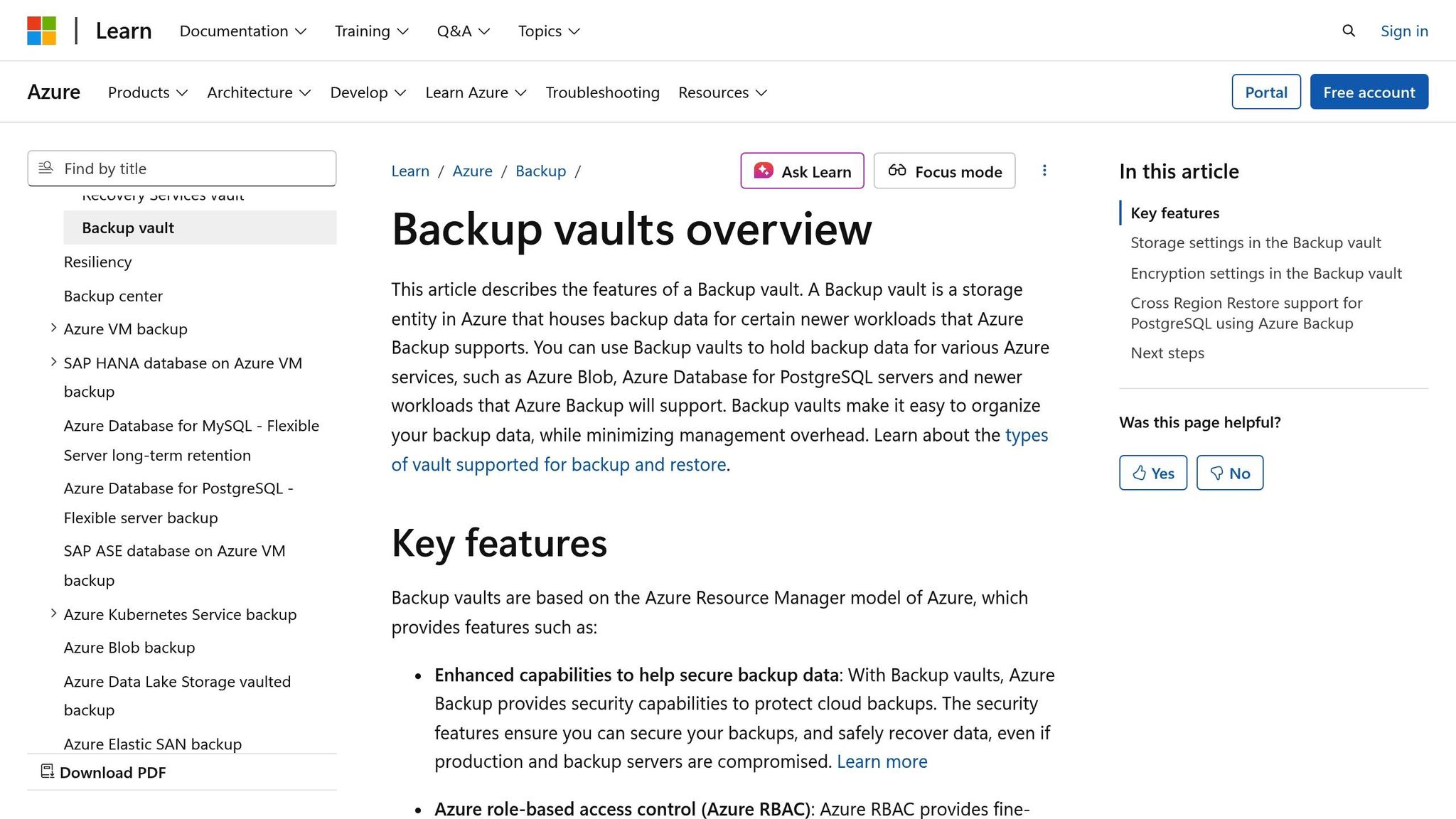
Azure Backup includes immutable vaults that rely on Write Once Read Many (WORM) storage. This ensures recovery points cannot be deleted or altered before their designated expiration date. It's a powerful safeguard against ransomware attacks and unauthorised tampering, both of which can jeopardise GDPR compliance. As Microsoft Learn puts it:
"Immutable vault can help you protect your backup data by blocking any operations that could lead to loss of recovery points".
Once you've validated your backup policies, it's crucial to lock the immutability setting, as this makes the configuration permanent. This step complements other security measures, ensuring that even if an account is compromised, backups cannot be altered. To further strengthen your GDPR compliance and guard against ransomware, enable vault immutability and apply the lock only after thorough testing. Additionally, make sure to implement Role-Based Access Control (RBAC) with least privilege principles, as discussed earlier.
To enhance data availability and support GDPR's right to erasure, enable the soft delete feature.
Optimise Azure Costs for GDPR Compliance
Complying with GDPR doesn't have to come with a hefty price tag. Choosing the right storage redundancy option can help you save money while still meeting data residency and availability requirements. For development workloads, Locally Redundant Storage (LRS) is a cost-effective choice, while Geo-Redundant Storage (GRS) should be reserved for production data. If you need to retain data for extended periods - like seven years or more - consider moving backups to the Azure Archive tier, which offers the lowest storage costs. Keep in mind, though, that retrieval from the archive tier is slower and incurs additional costs.
For SMBs aiming to balance cost efficiency with compliance, the Azure Optimization Tips, Costs & Best Practices blog provides practical advice on reducing expenses, designing cloud architecture, and enhancing security. Automating data cleanup through retention policies not only aligns with GDPR's data minimisation principles but also helps cut storage costs. These Azure-specific strategies fit neatly into the broader GDPR compliance framework discussed earlier.
Conclusion
Creating a GDPR-compliant backup policy doesn't have to feel like an impossible task. By focusing on key steps - documenting your lawful basis, limiting data collection, encrypting all data, and setting up automated retention schedules - you can build a reliable framework that safeguards both your customers and your business. As Izak Oosthuizen from Zhero aptly states:
"Encryption should become second nature; it is an excellent cyber-defence strategy."
These actions aren't just good practices - they're essential. Regular testing and updates are crucial to keep this security framework robust.
Make it a priority to test your restoration procedures frequently. Additionally, ensure your backups are stored separately from your main network to prevent malware from potentially compromising your recovery points.
GDPR compliance isn't a one-and-done effort - it demands ongoing review and adjustments. For instance, legislative changes such as the UK's Data (Use and Access) Act, which came into effect on 19 June 2025, underscore the need to revisit your policies periodically. To stay ahead, implement automated cost alerts at 90%, 100%, and 110% of your anticipated spend to detect configuration issues early. Regular audits will also help ensure your backup strategy remains effective and aligned with current requirements.
FAQs
What steps should SMBs take to ensure their data backups comply with GDPR?
To comply with GDPR when managing data backups, small and medium-sized businesses (SMBs) should begin with a risk-based assessment and establish a detailed, documented backup policy. This policy needs to pinpoint critical personal data, define clear retention periods, and assign staff responsibilities for managing backups. For added security, backups should be stored off-site or in approved UK/EU locations and encrypted with robust methods like AES-256.
Automating retention schedules is a must, as is routinely testing your restore processes to ensure they work effectively. Additionally, it’s crucial to have the ability to locate, export, or delete specific records to honour individuals’ data rights. Staff training on backup procedures and GDPR requirements is key to staying compliant. Regularly reviewing your backup policy will help you stay aligned with any regulatory updates or evolving business needs.
How can small and medium-sized businesses (SMBs) handle right-to-erasure requests for backup data under GDPR?
To manage right-to-erasure requests effectively, small and medium-sized businesses (SMBs) should weave this process into their existing records management and backup policies. Begin by assigning a data management lead who will oversee where personal data is stored, how long it’s kept, and ensure backups align with GDPR regulations. When a request comes in, acknowledge it promptly and aim to provide a response within one month.
Your backup policy should include automated retention rules to delete outdated data and maintain a log identifying which backups hold the requester’s information. If possible, remove the data from backups or plan for its secure deletion during the next scheduled purge. Tools such as Azure Backup can make this easier by offering features like encryption, retention policies, and audit logs to support compliance.
Make sure to document the entire workflow in a GDPR-compliant backup policy, and test it regularly - quarterly drills are a good practice. Keep thorough records of each request and the steps taken to address it, as this will help demonstrate compliance if needed. By taking these steps, SMBs can meet GDPR requirements while keeping their backup processes strong and secure.
What are the best practices for ensuring GDPR-compliant backup systems?
Testing and validating backup systems is a crucial part of staying compliant with GDPR. Backup data is subject to the same rules as live data when it comes to protection, retention, and respecting data subject rights. A solid Business Continuity and Disaster Recovery plan should outline where sensitive personal data is stored, set clear guidelines for backup frequency, and ensure backups are securely stored. Ideally, this storage should be off-site or in a location that meets UK-EU data residency requirements. Regular testing of both backups and recovery processes is essential to ensure they work effectively and remain compliant.
Here are some best practices to follow:
- Scheduled restore tests: Regularly perform both full and incremental restore tests. Compare the restored data with original checksums to ensure accuracy.
- Validation of security measures: During testing, confirm that encryption keys, retention policies, and tools for managing data subject rights are functioning as expected.
- Audit and update: Keep detailed records of test results, address any issues identified, and revise policies and procedures as necessary.
Involving staff in these activities is key. Training ensures they can carry out tests, analyse results, and provide evidence of compliance during audits. These steps not only support GDPR adherence but also minimise the risk of data loss or breaches.