Enterprise Agreement Pricing: Cost-Saving Strategies
Hands-on strategies to cut Azure EA costs using reservations, Savings Plans, Azure Hybrid Benefit, rightsizing and licence audits to control cloud spending.

Managing Azure Enterprise Agreement (EA) costs has become more challenging after Microsoft standardised pricing in 2025, eliminating volume-based discounts. Here's the bottom line: you need to take a hands-on approach to control cloud spending. This means leveraging tools like Azure Reservations, Savings Plans, and Hybrid Benefits to cut costs by up to 80%.
Key Takeaways:
- No More Volume Discounts: All EA customers now pay standard rates, so SMBs must actively explore cost-saving options.
- Commitment-Based Savings: Reserved Instances can save up to 72%, and combining them with Azure Hybrid Benefits can boost savings to 80%.
- Rightsizing Resources: Use Azure Advisor to identify underutilised virtual machines and adjust their sizes for better efficiency.
- Budgeting & Alerts: Set up budgets in Azure Cost Management to monitor and control spending effectively.
- EA vs CSP: Evaluate whether an Enterprise Agreement or Cloud Solution Provider (CSP) model better suits your business needs.
Quick Cost-Saving Steps:
- Analyse Usage: Use Azure Advisor for insights into idle or oversized resources.
- Commit to Reservations: Lock in discounted rates for predictable workloads.
- Leverage Hybrid Benefits: Save on licences for Windows Server and SQL Server.
- Audit Licences: Identify and eliminate unused licences before EA renewals.
- Switch Models if Needed: Consider moving to a CSP model for more flexibility.
Actionable Insight: Start preparing for EA renewals 12–18 months in advance. Negotiate pricing, lock in rates, and plan commitments conservatively to avoid overspending.
To maximise savings and streamline your Azure costs, focus on optimising resource usage, adopting commitment-based pricing, and using cost management tools. Ready to take control of your cloud expenses? Start with these strategies today.
Negotiate a Better Microsoft EA Deal in 2025
What Changed in Azure Enterprise Agreement Pricing in 2025

In 2025, Microsoft made a significant shift by removing volume-based pricing tiers (Levels B-D), which previously provided automatic discounts for higher usage levels. Now, all Enterprise Agreement (EA) customers are charged the same standard rates, aligning with the pay-as-you-go pricing available through the Microsoft Customer Agreement.
This change means small and medium-sized businesses (SMBs) can no longer depend on automatic volume discounts to lower their costs. Instead, they need to actively adopt commitment-based savings strategies, such as Azure Reservations and Savings Plans. The updated pricing structure reflects Microsoft's "new commerce experience", ensuring customers paying directly receive the same rates as those under an EA. This shift requires a proactive approach to managing cloud expenditure and reserved capacity.
Azure pricing is standardised in USD globally and converted to GBP using London closing spot rates from two business days before the last business day of the previous month. Consequently, monthly payments for reservations may vary due to exchange rate fluctuations, even though the USD price remains constant.
How Standardised Pricing Affects SMBs
With the removal of automatic discounts, baseline costs could rise unless organisations take active steps to manage expenses. This has prompted some businesses to rethink their financial strategies. Sonal Gupta, Senior Manager FinOps and Hosting Service Delivery at Carlsberg Group, shared:
"The solution supports financial awareness; everyone feels accountable for their cloud spend and avoids additional costs. We can budget and forecast, investing in just what we need, without cost spikes."
For SMBs, this means transitioning from a passive, tier-based model to a more engaged, commitment-driven approach. Regularly evaluating workloads can help identify usage patterns that are well-suited for commitment-based offers, which can lead to meaningful cost reductions.
Understanding the financial implications of these changes is critical, and the following steps can help you estimate the impact.
How to Calculate Your Potential Cost Increases
Forecasting potential cost increases is essential for planning cost-saving strategies. To estimate the financial impact of moving from tiered EA pricing to standardised rates, follow these steps:
- Download the Amortised charges (usage and purchases) file from the Azure Portal. Log in, navigate to Cost Management + Billing, select your EA billing scope, and go to Usage + charges.
- Open the CSV file in Excel and filter the ChargeType column for Usage entries.
- Add a new column called "TotalUsedSavings" and apply this formula:
(UnitPrice – EffectivePrice) × Quantity.
Here, UnitPrice refers to the standard rate, while EffectivePrice shows what you previously paid with tier discounts. Summing this column will reveal the total value of your EA discounts.
If the UnitPrice increases due to the removal of volume tiers, this calculation will help you estimate the cost difference. For example, if your previous EffectivePrice was £0.08 per hour for a virtual machine and the new UnitPrice is £0.10 per hour, the £0.02 difference multiplied by your total usage will give you the estimated monthly increase. This information provides a baseline to evaluate whether commitment-based options, like reservations, can help offset the loss of automatic discounts.
How to Optimise Resource Usage in Azure Enterprise Agreements
Efficient resource management is key to cutting Azure costs under an Enterprise Agreement. With standardised pricing in place, businesses must strike a balance between predictable costs and fluctuating resource demands. For small and medium-sized businesses (SMBs), this involves identifying inefficiencies, committing to consistent workloads, and taking advantage of Azure Cost Management tools. Below, we explore how to fine-tune resources, utilise reserved rates, and keep expenses in check.
Rightsizing Virtual Machines and Workloads
Azure Advisor provides a detailed analysis of CPU, memory, and network usage, reviewing activity every 30 seconds over a period of 7 to 90 days. This tool highlights virtual machines (VMs) that exceed actual demand, helping businesses identify opportunities for cost savings. For example, a VM is flagged as idle if its P95 CPU usage stays below 3% and its outbound network traffic remains under 2% for seven consecutive days. Similarly, VMs with CPU usage of 5% or less and network data consumption of 7 MB or less over four days are recommended for resizing to a more economical SKU.
Adjusting VM sizes based on these metrics can lead to significant savings. For workloads with low CPU usage but occasional spikes, switching to B-series (burstable) SKUs offers a cost-effective solution. These SKUs minimise baseline costs while maintaining performance during peak demand. Keep in mind that resizing requires a VM restart, so schedule these changes outside of business hours.
Azure Advisor's thresholds can be customised to suit your operational needs, and the lookback period can be extended to align with longer business cycles. Before implementing any resizing recommendations, verify the utilisation metrics in the VM details. Some low-usage VMs may serve specific purposes, such as disaster recovery or preparations for a traffic surge, and may not benefit from resizing.
In addition to rightsizing, committing to reserved pricing plans is another effective way to manage costs.
Reserved Instances and Dev/Test Rates
For workloads that are stable and predictable, Reserved Instances can deliver up to 72% savings compared to pay-as-you-go pricing. By committing to a one-year or three-year term, businesses can lock in discounted rates. Enterprise Agreement customers can choose between a single upfront payment or monthly billing at no extra cost. When paired with the Azure Hybrid Benefit - which allows businesses to reuse existing Windows Server and SQL Server licences - total savings can reach up to 80%.
This approach is ideal for workloads with consistent demand. For non-production environments, Dev/Test pricing removes Microsoft software charges on Azure VMs, further reducing costs. Additionally, for tasks that can tolerate interruptions, such as batch processing or rendering, Azure Spot Virtual Machines offer discounts of up to 90% by utilising unused capacity.
While reserved pricing plans help reduce predictable costs, tracking and managing expenses effectively requires the right tools.
Azure Cost Management Tools
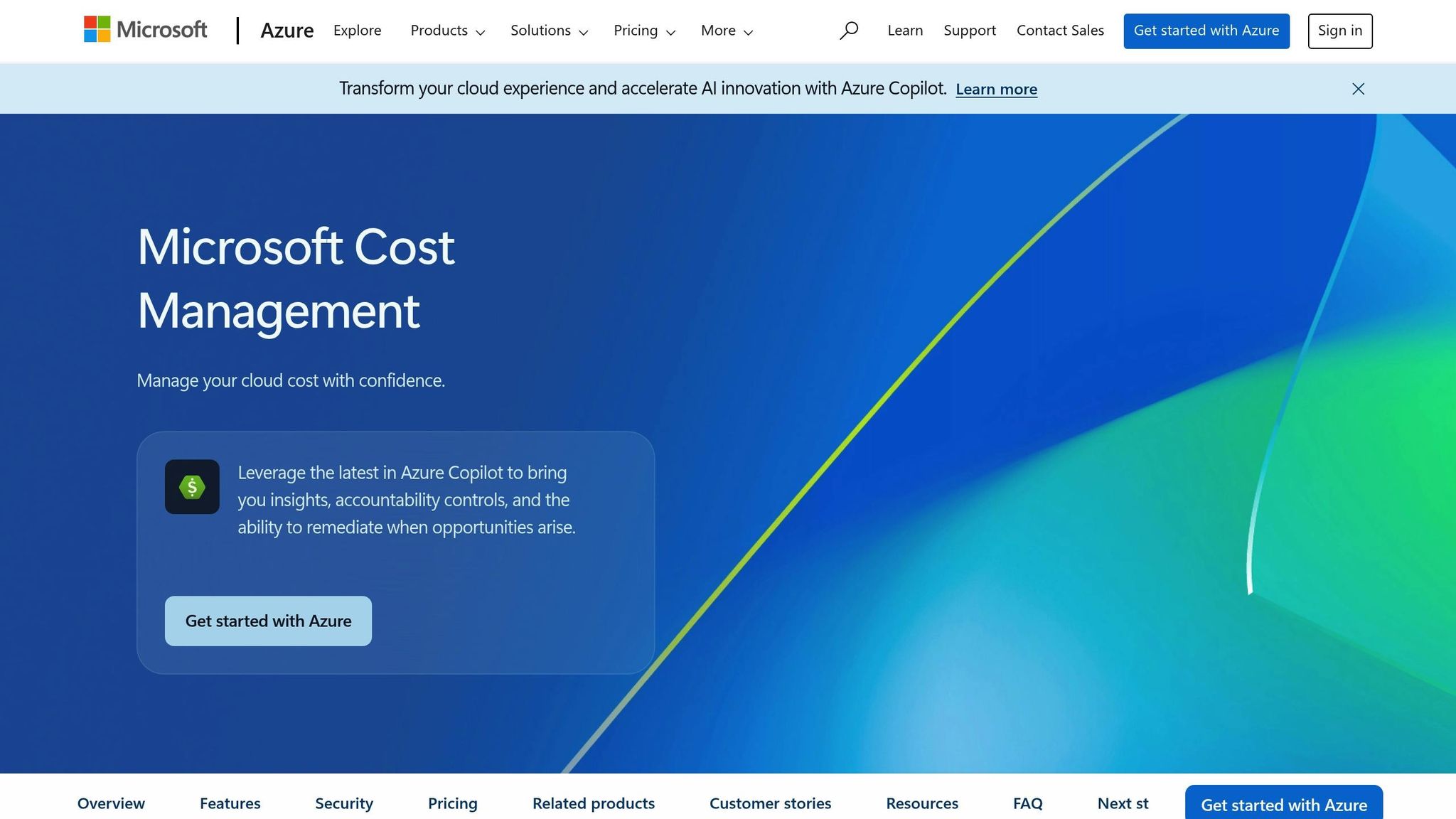
Azure Cost Management + Billing is a free toolset that helps businesses monitor resource usage, set budgets, and allocate costs to specific teams or projects. Automated alerts can notify stakeholders when spending hits 50%, 80%, or 100% of the allocated budget. By using tag inheritance, businesses can group costs by team or project to maintain better control.
ASOS provides a great example of how these tools can make a difference. Ian Margetts, Infrastructure Services Lead, shared:
"Working with Microsoft has been really powerful. Getting access to features that provide cost management and being able to interact directly with the Microsoft team has made a big difference to our ability to get to the right cost place."
Regular audits are also crucial. Look for resources that continue to incur charges even after a VM is deleted, such as unattached disks or public IPs. Cleaning up these hidden costs can lead to further savings.
For more advice on optimising Azure costs and performance, check out Azure Optimization Tips, Costs & Best Practices.
Comparing the Cloud Solution Provider (CSP) Model to Enterprise Agreements
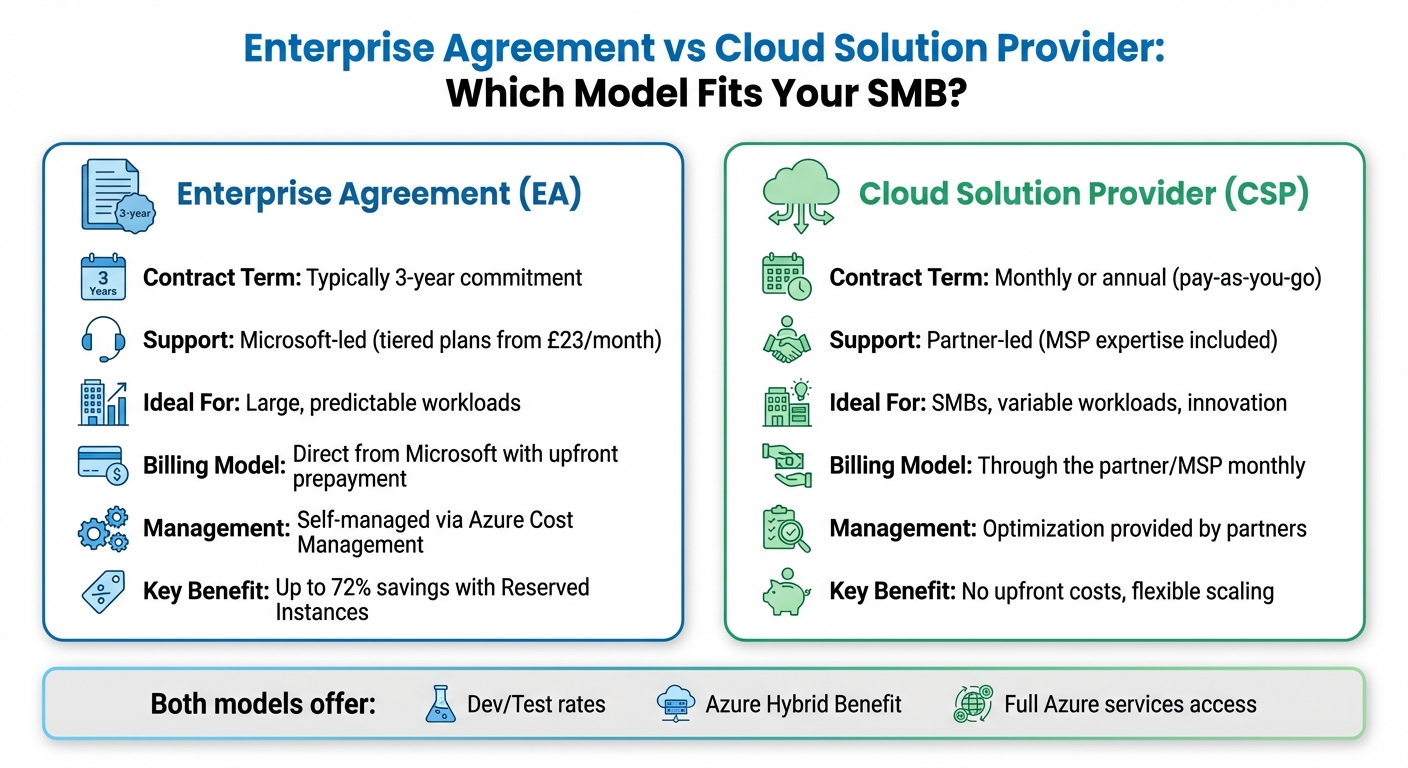
Azure EA vs CSP Model Comparison for SMBs
When it comes to streamlining costs and maximising efficiency, choosing the right pricing model is a critical decision for small and medium-sized businesses (SMBs). For many, this choice often boils down to two options: an Enterprise Agreement (EA) or the Cloud Solution Provider (CSP) model. The best fit depends on factors like workload predictability and the resources available within the organisation.
Enterprise Agreements typically involve multi-year commitments, while the CSP model offers a more flexible, pay-as-you-go approach with monthly billing. This fundamental difference impacts cost management and the level of support available.
EA vs CSP: Which Model Works for Your SMB?
At the heart of this decision lies the balance between flexibility and commitment. Enterprise Agreements are well-suited for organisations with consistent, high-volume workloads. These businesses can take advantage of Reserved Instances, which can deliver savings of up to 72% compared to standard rates. However, for SMBs with fluctuating demands, this model may lead to over-provisioning and unnecessary expenses for unused resources.
The CSP model, on the other hand, is designed to address these challenges. It allows businesses to scale resources up or down as needed, with no long-term commitments. SMBs can also benefit from working with a Managed Service Provider (MSP), who can handle technical support, migration assistance, and security management. Strategix, a CSP provider, highlights this advantage:
"As an official Cloud Solution Provider (CSP), we're able to offer exclusive pricing that beats advertised rates."
Here’s a quick comparison of the two models:
| Feature | Enterprise Agreement (EA) | Cloud Solution Provider (CSP) |
|---|---|---|
| Contract Term | Typically 3-year commitment | Monthly or annual (pay-as-you-go) |
| Support | Microsoft-led (tiered plans from £23/month) | Partner-led (MSP expertise included) |
| Ideal For | Large, predictable workloads | SMBs, variable workloads, innovation |
| Billing Model | Direct from Microsoft with upfront prepayment | Through the partner/MSP monthly |
| Management | Self-managed via Azure Cost Management | Optimisation provided by partners |
Both models offer access to Dev/Test rates and the Azure Hybrid Benefit. However, their support structures differ significantly. EA customers must purchase separate support plans, which range from £23 per month for Developer support to £780 per month for Professional Direct support. In contrast, CSP customers typically receive integrated support through their partner, making it a more cost-effective option for smaller businesses.
When to Switch from EA to CSP
Switching from an EA to a CSP model can be a smart move for businesses facing fluctuating workloads or tight cash flow.
Before making the switch, it’s essential to audit your current resource usage and check the status of any existing reservations. Pay particular attention to the expiration dates of EA reservations, as prepayments are applied first to these purchases. Tools like the Azure pricing calculator can help you compare the costs of a pay-as-you-go model against your current arrangement.
For SMBs, the CSP model is especially appealing because it aligns costs with actual usage, eliminating the need to predict capacity far in advance. The absence of upfront payments and the flexibility of monthly billing can improve cash flow while still granting access to the full suite of Azure services. Additionally, for businesses without in-house financial operations expertise, the guidance provided by a CSP partner can be invaluable in optimising costs and managing resources effectively.
How to Negotiate EA Renewals for Long-Term Savings
When it comes to managing your Enterprise Agreement (EA), a proactive, well-planned negotiation strategy can lead to significant savings over the long term. Start preparing 12–18 months before your agreement's expiration. By doing so, you can secure better pricing and avoid unnecessary expenses for the next three years. As one industry guide explains:
"Preparation means you negotiate from a position of strength rather than reacting to Microsoft's agenda and timeline".
To ensure success, bring together a cross-functional team. Include representatives from IT, procurement, finance, and legal, and have a senior executive like your CIO or CFO act as the sponsor. This centralised approach ensures clear communication with Microsoft throughout the process. Timing also matters - finalising negotiations near Microsoft's fiscal year-end (30 June) or quarterly deadlines can work to your advantage, as sales teams may offer more favourable terms to meet their targets.
Once your team is in place, start by reviewing your current licences and building a cost model to support your negotiations.
Conducting Licence Audits Before Renewal
A thorough licence audit is your first step towards eliminating unnecessary costs. By identifying unused licences, you can stop paying for resources you no longer need. Tools like Azure Advisor can help you pinpoint idle resources, such as underutilised virtual machines or ExpressRoute circuits, which can either be shut down or reconfigured.
Another cost-saving tactic is downgrading users who don’t require advanced features. For instance, you might move certain employees from Microsoft 365 E5 to E3 licences. This "true-down" strategy reduces your licence count and resets your baseline costs. Use scenario modelling to compare different licence combinations, Azure consumption levels, and support costs. Armed with this data, you can set budget limits early in the negotiations, ensuring that Microsoft responds to your needs rather than pushing its standard sales offers.
After completing your audit, use the findings to create a clear, long-term strategy for managing costs.
Creating a Custom Roadmap for Cost Efficiency
Your EA renewal should align with a broader IT strategy focused on saving money and improving efficiency. One way to achieve this is by developing a detailed cost model that accounts for upfront costs, ongoing expenses, and potential unplanned spending. As Microsoft's Well-Architected Framework advises:
"A cost model should estimate the initial cost, run rates, and ongoing costs. Negotiate a budget that covers a cost model and has a buffer for unplanned spending".
To protect your budget, lock in unit pricing for three years to avoid annual price hikes or currency fluctuations. Negotiate "true-down" rights, which allow you to reduce your licence counts each year, and commit to Azure cautiously to avoid wasting money on unused resources.
Here’s a quick look at some key negotiation points:
| Negotiation Item | Suggested Strategy |
|---|---|
| Price Caps | Fix unit pricing for three years to shield against increases. |
| True-Down Rights | Ensure you can lower licence counts at annual intervals. |
| Azure Commitment | Make conservative commitments to avoid wasting unused budget. |
| AI/New Products | Treat these as optional pilot programmes instead of committing enterprise-wide. |
To further strengthen your position, benchmark pricing with third-party advisors or through networking with peers. Organisations of a similar size often manage to negotiate discounts of around 20% off the list price. It’s also wise to establish clear walk-away terms. If the EA terms don’t work for you, consider switching temporarily to a month-to-month Cloud Solution Provider (CSP) model. This gives you leverage and ensures you won’t feel pressured into accepting an unfavourable deal simply because time is running out.
For more tips on managing your Azure costs, check out Azure Optimization Tips, Costs & Best Practices.
Summary: Cost-Saving Strategies for SMBs
Cutting down on Azure EA expenses requires a mix of immediate resource adjustments and smart planning. Leveraging Azure Reservations, Savings Plans, and the Azure Hybrid Benefit can reduce costs by 72%, 65%, and up to 85%, respectively.
Strengthening operational governance is key. Tools like Azure Advisor can pinpoint idle resources and automate the shutdown of non-production workloads. Adjusting the size of underused virtual machines and taking advantage of Dev/Test pricing for development environments can significantly reduce spending without affecting performance. Real-world examples show substantial savings, with some companies cutting costs by over €1 million monthly. These steps ensure your licences are aligned with actual usage.
Beyond resource management, reviewing licensing and exploring alternative billing models can help maintain affordability in the long run. Before renewing your EA, conduct a detailed licence audit to identify underused resources. Evaluate your current usage and forecast future needs to ensure your EA terms align with your business goals. If the EA model doesn’t meet your needs, consider switching to the more flexible partner-managed CSP model.
To avoid unexpected costs, set up budget alerts in Microsoft Cost Management. Combining proactive forecasting, commitment pricing, and continuous resource monitoring ensures you only pay for what you actually use. For more tips on optimising your Azure setup, check out Azure Optimization Tips, Costs & Best Practices.
FAQs
How can small and medium-sized businesses save costs without relying on volume discounts with Azure Enterprise Agreement pricing?
Small and medium-sized businesses (SMBs) can cut costs on Azure without relying on volume-based discounts by using a few smart strategies. For instance, the Azure Hybrid Benefit helps lower expenses on Windows Server and SQL Server licences. Meanwhile, options like Spot Virtual Machines and Reserved Instances can offer significant savings compared to standard pay-as-you-go pricing. To further trim costs, businesses can focus on right-sizing and scheduling resources, choosing the right storage tier, and making the most of dev/test discounts.
To keep costs in check over time, tools like Azure Advisor or Cost Management alerts are invaluable. These tools help track and optimise spending, potentially slashing costs by as much as 80% compared to regular rates. By adopting these strategies, SMBs can stretch their budgets while growing efficiently on Azure.
What are the advantages of moving from an Enterprise Agreement (EA) to a Cloud Solution Provider (CSP) model?
Switching from an EA to a CSP model can bring more flexibility and better cost control for small and medium-sized businesses (SMBs). With the CSP model, you benefit from pay-as-you-go billing, which means your costs align directly with your actual usage. This approach is perfect for businesses that want to avoid the upfront financial commitments tied to an EA.
On top of that, the CSP model offers competitive pricing, streamlined contracts, and advanced cost management tools to help you make the most of your Azure budget. While you might miss out on the volume discounts that come with an EA, the flexibility and tools available in the CSP model can often balance things out, making it a smart option for businesses on the rise.
How can Azure Cost Management help reduce cloud expenses?
Azure Cost Management equips you with tools to keep your cloud spending under control. With it, you can track usage, keep an eye on expenses, and set budgets to prevent overspending. It also includes cost-allocation policies, enabling you to divide expenses among teams or projects. Plus, you'll receive alerts if there are any unexpected spikes in spending.
On top of that, Azure offers tailored optimisation suggestions. These recommendations help you pinpoint ways to cut costs without compromising performance. Together, these features make it easier for businesses to manage their Azure spending wisely and stick to their budgets.