
Top 5 Azure Lifecycle Automation Tools
Compare five Azure tools to automate resource lifecycles, enforce governance and reduce cloud costs.

Managing Azure resources manually can be time-consuming and costly, especially as your environment grows. Automation tools can help reduce waste, improve efficiency, and maintain control. Here are the top five Azure tools for lifecycle automation:
- Azure Automation: Automates repetitive tasks like patching and VM scheduling, saving time and reducing costs.
- Azure Resource Manager (ARM): Simplifies infrastructure deployment with templates and integrates governance features.
- Azure Blueprints: Useful for compliance-heavy setups but will be deprecated on 11 July 2026.
- Azure Automanage: Automatically applies best practices to VMs, simplifying management.
- Azure DevOps Pipelines: Automates CI/CD workflows for application and infrastructure deployments.
Quick Comparison
| Tool | Key Feature | Ideal For | Cost Model |
|---|---|---|---|
| Azure Automation | Task automation & patching | Hybrid setups | Pay-as-you-go (500 free mins) |
| ARM / Bicep | Infrastructure as Code (IaC) | Consistent deployments | Free (pay for resources) |
| Azure Blueprints | Governance & compliance | Legacy systems (deprecated 2026) | Free |
| Azure Automanage | VM best practice automation | Simple VM management | Free service (pay for onboarded services) |
| Azure DevOps Pipelines | CI/CD workflows | Development-driven teams | Free tier available |
These tools streamline Azure resource management, cut costs, and ensure compliance, making them essential for businesses of all sizes. Start with Azure Automanage for ease or ARM Templates for code-driven deployments.
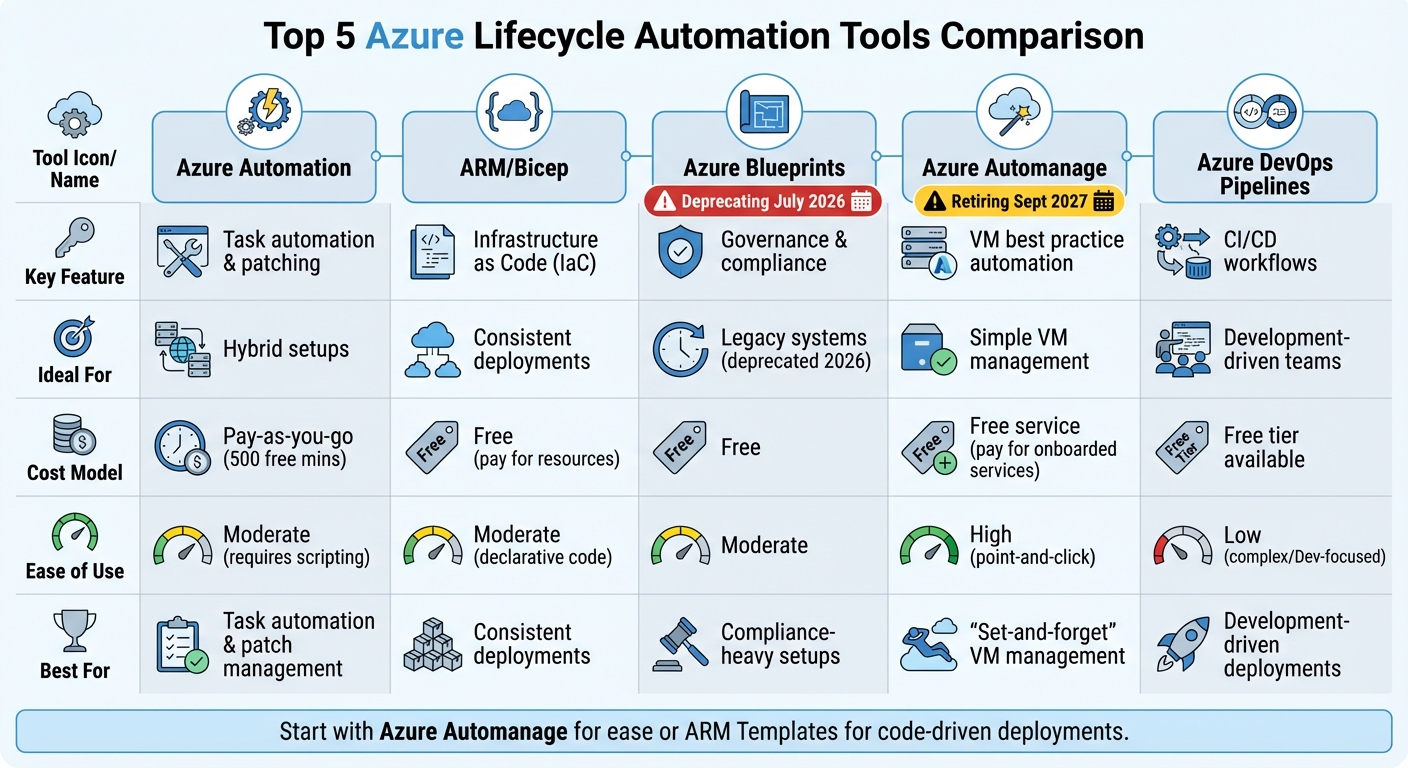
Azure Lifecycle Automation Tools Comparison Chart
Modernizing Azure Automation with Runtime Environments - Andres Bohren
1. Azure Automation
Azure Automation is a service designed to handle repetitive tasks by using serverless PowerShell and Python runbooks. Think about all the time spent manually patching servers - this tool takes over the heavy lifting. From automating operating system updates to keeping an eye on configuration drift across your entire Azure setup, it’s got you covered.
Automation Capabilities
Azure Automation offers three core functions: process automation, update management, and configuration management.
- Process automation tackles repetitive tasks like shutting down development environments after hours or reacting to monitoring alerts.
- Update management schedules and deploys patches for both Windows and Linux systems, whether they’re in Azure, on-premises, or in hybrid setups, all within defined maintenance windows.
- Configuration management uses PowerShell Desired State Configuration (DSC) to ensure machines stick to their intended settings. If something drifts from the baseline, it automatically corrects it.
For businesses with hybrid setups, Hybrid Runbook Workers extend automation outside Azure, managing tasks across on-premises and external environments. This feature is especially handy for small and medium-sized businesses (SMBs) juggling hybrid infrastructure, as it allows centralised control without extra hassle.
Cost-Effectiveness for SMBs
Azure Automation isn’t just about saving time - it’s also about cutting costs. By automating manual operations, businesses can slash expenses by up to 60%. The service follows a pay-as-you-go pricing model, and new users get an initial £200 credit alongside access to 55+ always-free services.
For those looking to trim costs further, the Azure Resource Optimisation (ARO) Toolkit is a game-changer. It uses Automation runbooks to “snooze” virtual machines during periods of low CPU usage or according to pre-set schedules, helping to eliminate unnecessary compute expenses.
Governance and Compliance Features
Azure Automation also steps up when it comes to governance and compliance. Change Tracking and Inventory keeps tabs on applications, services, files, and registry changes, making it easier to investigate issues and spot unauthorised modifications.
On top of that, it integrates seamlessly with Azure Monitor and Azure Policy, triggering automated fixes when resources stray from their intended state or when performance thresholds are breached. These features are a big win for SMBs, providing robust control and compliance without the need for a dedicated compliance team.
Next, we’ll dive into another Azure tool that plays a key role in lifecycle automation.
2. Azure Resource Manager (ARM)
Azure Resource Manager (ARM) acts as the management layer for all requests related to creating, updating, and deleting Azure resources. Unlike Azure Automation, which focuses on executing tasks, ARM is centred around defining and deploying infrastructure through code. The best part? It's included at no extra charge - you only pay for the resources you deploy. This makes ARM a solid foundation for managing infrastructure efficiently while enabling advanced automation.
Automation Capabilities
ARM leverages Infrastructure as Code (IaC) to define your Azure environment using templates. These templates can be written in JSON or, for a simpler approach, in Bicep - a language that's gaining traction in newer projects. During deployment, Bicep is automatically converted into ARM templates, offering the same functionality with less complexity.
A standout feature of ARM templates is their ability to handle parallel, idempotent deployments. This means you can deploy resources without worrying about duplicates, and the "what-if" operation provides a preview of the changes a template will make before deployment. For governance, ARM supports features like resource locks, tagging for cost tracking, and integration with Azure Policy to automate compliance checks.
Seamless Integration with Azure
ARM is deeply embedded within Azure, ensuring smooth compatibility across nearly all of its services. It integrates directly with Azure Policy for real-time compliance fixes and works effortlessly with tools like Azure DevOps and GitHub Actions, making it a great fit for CI/CD pipelines. With over 3,000 modules in the PowerShell Gallery and more than 450 managed connectors via Azure Logic Apps, ARM offers incredible flexibility. It also supports deployments across different scopes, including Resource Groups, Subscriptions, Management Groups, and even Tenants, giving you the freedom to organise and manage resources in a way that suits your needs.
Cost-Effectiveness for SMBs
For small and medium-sized businesses (SMBs) keeping a close eye on budgets, ARM's features are a game-changer. Resource tagging allows you to categorise expenses by department or project, making it easier to track spending. Resource groups simplify management by letting you handle related resources as a single unit - perfect for cleaning up after a project is completed without leaving unused resources behind. The idempotent nature of ARM templates ensures you won't accidentally create duplicate resources during redeployments, while the "what-if" analysis helps you avoid costly configuration errors.
On top of that, Microsoft invests over US$1 billion annually in cybersecurity research to protect the infrastructure managed by ARM, giving SMBs access to enterprise-level security at no additional cost. To explore ways to optimise your Azure spending, check out "Azure Optimization Tips, Costs & Best Practices" (https://azure.criticalcloud.ai).
Governance and Compliance Features
ARM provides robust governance tools, making it particularly useful for SMBs that might not have dedicated compliance teams. Resource locks prevent accidental deletions or modifications of critical assets, while integration with Azure Policy automatically fixes non-compliant resources, reducing the need for manual intervention. With over 3,500 security experts working to secure the Azure ecosystem, Microsoft ensures a high level of data protection and privacy.
Infrastructure changes can be tracked and audited by checking templates into source control, and verified templates can be stored as Template Specs. This ensures that all deployments meet your organisation's cost and compliance standards. ARM simplifies governance while maintaining high compliance and security standards, even for smaller teams.
3. Azure Blueprints
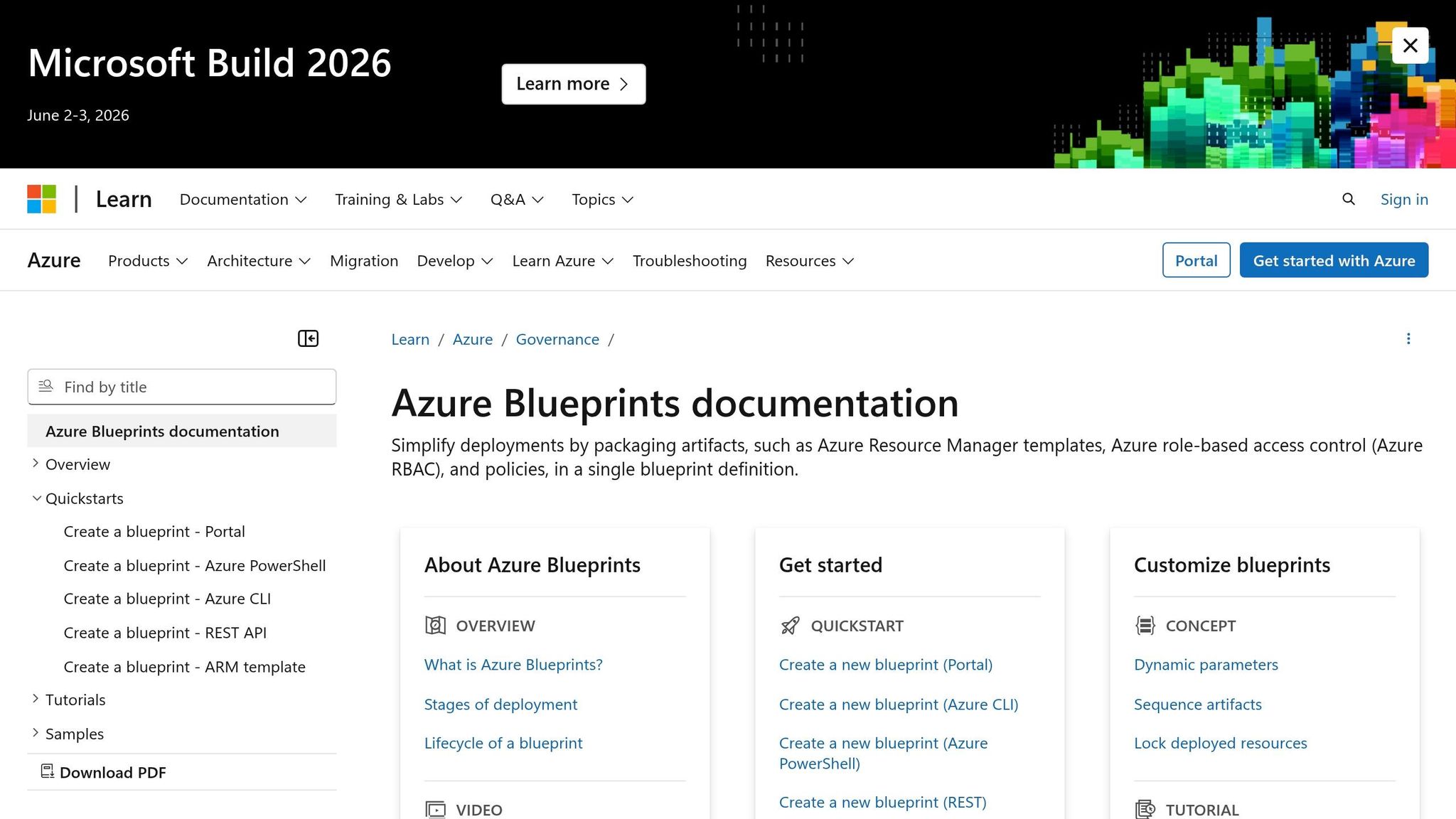
Azure Blueprints is set to be deprecated on 11 July 2026. Organisations still using it should migrate to Template Specs and Deployment Stacks as soon as possible . However, understanding its features is still relevant for those managing legacy systems or transitioning environments.
Governance and Compliance Features
Azure Blueprints, similar to Azure Automation and ARM templates, simplifies resource management. However, with its deprecation on the horizon, transitioning legacy setups is crucial. What sets Blueprints apart is its ability to package governance controls into a single, reusable definition. Unlike standard ARM templates, which deploy resources and then disconnect, Blueprints maintains an active link to deployed resources . This connection allows users to monitor changes, audit deployments, and apply updates across multiple subscriptions. This functionality is especially helpful for small and medium-sized businesses (SMBs) managing multiple environments without dedicated compliance teams.
Blueprints bring together four core components: Role Assignments, Policy Assignments, ARM templates, and Resource Groups. Prebuilt regulatory templates, such as those for ISO 27001 and NIST SP 800-53, make it easier to establish compliance frameworks, saving SMBs time and the need for extensive expertise . Additionally, resource locking ensures that even subscription owners cannot make unauthorised modifications to critical infrastructure, adding a layer of security to shared resources.
"Azure Blueprints allows our central IT to ensure the right guardrails are in place, helping our DevOps teams move fast while maintaining control and protecting the business." - Pete Apple, Lead Service Engineer, Microsoft
These governance features not only strengthen compliance efforts but also align with cost-saving strategies, discussed below.
Cost-Effectiveness for SMBs
Azure Blueprints deploys resources at standard Azure rates , making it an affordable option for smaller organisations needing robust governance without additional licensing costs. Its self-service model allows developers to create compliant environments on their own, reducing the need for constant intervention from cloud architects . For detailed advice on managing Azure costs and optimising spending, visit "Azure Optimization Tips, Costs & Best Practices" (https://azure.criticalcloud.ai).
While Azure Blueprints supports governance for legacy systems, its features align well with SMBs' lifecycle management strategies, providing a bridge until migration is complete.
4. Azure Automanage
Azure Automanage is set to retire on 30 September 2027, meaning new deployments should transition to Azure Policy. That said, it remains a useful option for small and medium-sized businesses (SMBs) managing existing virtual machine (VM) environments during this period. Designed with SMBs in mind, Azure Automanage simplifies VM operations by automatically applying best practices throughout the lifecycle of your VMs.
Automation Capabilities
Azure Automanage makes it easy to maintain consistent best practices for both Windows Server and Linux VMs. It handles tasks like automatically enrolling, configuring, and monitoring tools such as Azure Backup, Azure Monitor, Microsoft Defender for Cloud, and Update Management. The service also ensures compliance by detecting and fixing configuration drift.
Users can choose from predefined profiles like 'Dev/Test' or 'Production' or create custom configurations tailored to specific workloads. For Windows Server users, there are additional perks like Hotpatch, which allows security updates without a reboot, and SMB over QUIC, which enables secure remote file access without the need for a VPN.
Ease of Integration with Azure
Setting up Automanage is straightforward, although you'll need 'Owner' or 'Contributor' and 'User Access Administrator' roles to get started. For hybrid environments, Azure Arc extends Automanage's functionality to on-premises and multi-cloud servers, allowing for unified governance across all deployments.
However, keep in mind that from 1 February 2025, services relying on the Microsoft Monitoring Agent (MMA) will no longer be supported. Migrating to the Azure Monitor Agent (AMA) is essential for services like Change Tracking, VM Insights, and Update Management to continue functioning.
Cost-Effectiveness for SMBs
Azure Automanage itself is free. SMBs only pay for the Azure services it configures, such as Azure Backup or Log Analytics, which are billed at their usual rates. By automating routine tasks and reducing manual errors, Automanage helps cut downtime and improve efficiency. Features like Hotpatch further ensure availability during updates, keeping services running smoothly.
Governance and Compliance Features
Automanage simplifies compliance by automatically applying Microsoft server security baselines to both Windows and Linux VMs, reducing the risk of configuration errors. It continuously monitors for configuration drift and can automatically fix issues on Windows VMs to maintain compliance. For SMBs in regulated sectors, the ability to create custom configuration profiles offers flexibility to meet specific requirements. When combined with hybrid support via Azure Arc, Automanage ensures consistent compliance across all deployments.
Next, we’ll take a closer look at another key tool in Azure’s lifecycle automation suite: Azure DevOps Pipelines.
5. Azure DevOps Pipelines
Azure DevOps Pipelines is part of the Azure toolkit designed to streamline lifecycle management. It focuses on automating deployment processes through Continuous Integration and Continuous Delivery (CI/CD). This tool is particularly suited for small and medium-sized businesses (SMBs) managing both infrastructure and application deployments, as it brings a code-centric approach to automation.
Automation Capabilities
Azure DevOps Pipelines automates the entire process, from code commits to production deployment. It supports both YAML and visual editing, offering flexibility to match varied technical requirements. Automated testing and gated deployments are built into the platform, ensuring that only high-quality code reaches production.
The tool integrates seamlessly with infrastructure-as-code (IaC) solutions like ARM templates and Azure Bicep, enabling teams to version-control their infrastructure alongside application code. This ensures consistency and repeatability across development, staging, and production environments. Additionally, its compatibility with Azure's version control systems and policies strengthens its automation capabilities.
Ease of Integration with Azure
Pipelines works natively with Azure Repos, GitHub, and Bitbucket, allowing SMBs to continue using their preferred version control systems while tapping into Azure's deployment features. It also integrates with Azure's governance tools, enabling automated security and compliance enforcement.
"Automation isn't just about saving time - it's about doing more with less, reducing errors, and unlocking agility across your cloud infrastructure" – Anil Sharma, IT Administrator and DevOps Engineer
Cost-Effectiveness for SMBs
Azure DevOps Pipelines uses a pay-as-you-go pricing model, with no upfront costs or termination fees. It even offers a free tier with initial Azure credits, making it accessible for businesses with tight budgets. By catching errors early through automated testing, it helps avoid costly production issues. Built-in role-based access control (RBAC) also reduces compliance-related expenses. For more ways to manage costs effectively, explore Azure Optimisation Tips, Costs & Best Practices (https://azure.criticalcloud.ai).
Governance and Compliance Features
Governance and compliance are central to Pipelines. Features like role-based access control and gated deployments ensure that standards are met before code moves to production. Integration with Azure Policy enables automated governance checks during deployment, helping teams maintain compliance without manual intervention. For SMBs in regulated industries, this reduces the risk of configuration errors while maintaining consistent security standards across all environments.
Tool Comparison
The reviews above highlight the strengths and ideal use cases of each Azure automation tool. Selecting the right one depends on your organisation's technical expertise, budget, and specific needs. Each tool in Azure's lifecycle management ecosystem serves a distinct purpose.
Azure Automanage is perfect for small and medium-sized businesses (SMBs) with limited IT resources. It’s simple to use and comes with a free service model - though you’ll pay for the Azure services it configures, like Backup or Monitor.
Azure Automation is designed for organisations needing task automation and patch management across hybrid environments. It includes 500 free minutes per month, with additional usage billed on a pay-as-you-go basis. However, it requires PowerShell or Python skills, which may not suit teams without scripting expertise.
Here’s a quick comparison of the tools, focusing on their primary features, ease of use, cost considerations for SMBs, and best use cases:
| Tool | Primary Capability | Ease of Use | SMB Cost | Best For |
|---|---|---|---|---|
| Azure Automation | Process & update management | Moderate (requires scripting) | Low (pay-as-you-go, 500 free minutes) | Task automation & patch management |
| ARM / Bicep | Infrastructure as Code | Moderate (declarative code) | Free (you pay only for deployed resources) | Consistent deployments |
| Azure Blueprints | Environment orchestration | Moderate | Free (deprecating 11 July 2026) | Compliance-heavy setups |
| Azure Automanage | Best practice automation | High (point-and-click) | Free service (you pay for onboarded services) | "Set-and-forget" VM management |
| Azure DevOps Pipelines | CI/CD workflows | Low (complex/Dev-focused) | Free tier for small teams | Development-driven deployments |
ARM and Bicep allow repeatable deployments at no additional cost, whereas Azure Blueprints is being phased out by 11 July 2026, making it less suitable for long-term strategies. Meanwhile, Azure DevOps Pipelines is ideal for development-centric teams but requires a deeper technical understanding.
This breakdown helps SMBs identify the most suitable Azure automation tool to simplify resource lifecycle management.
For more expert advice on managing Azure costs and best practices tailored for SMBs, check out Azure Optimisation Tips, Costs & Best Practices (https://azure.criticalcloud.ai).
Conclusion
Managing Azure resources effectively doesn’t require a massive IT team or an endless budget. The five tools highlighted in this guide - Azure Automation, ARM Templates, Azure Blueprints, Azure Automanage, and Azure DevOps Pipelines - each tackle specific aspects of lifecycle automation, making them indispensable for businesses of all sizes.
For small and medium-sized businesses (SMBs) with limited technical expertise, Azure Automanage is a perfect starting point. It automatically enforces Microsoft’s security baselines and best practices without needing any scripting skills, and the service itself is free to use. Pair this with the free tier of Azure Automation, and you can begin automating tasks like virtual machine (VM) scheduling to eliminate unnecessary compute costs.
Each tool serves a unique purpose. If you’re comfortable working with code, ARM Templates allow for consistent, error-free deployments without extra costs. Meanwhile, development-focused teams will find Azure DevOps Pipelines seamlessly integrates into their existing workflows. These tools not only provide immediate cost savings but also lay the groundwork for ongoing efficiency improvements.
To get started, take advantage of native, free tools like Azure Advisor and Microsoft Cost Management. These can help you quickly optimise VM sizes and explore Reserved Instances. For more detailed advice on cutting cloud expenses, visit Azure Optimisation Tips, Costs & Best Practices. Once you’ve tackled the basics, you can introduce automation through Automanage or scheduled runbooks to ensure continuous optimisation. This strategy not only delivers quick wins but also establishes scalable practices for the future.
For more insights into managing Azure costs, boosting performance, and implementing SMB-focused strategies, check out Azure Optimisation Tips, Costs & Best Practices for expert advice and actionable tips.
FAQs
Which Azure automation tool should I start with as an SMB?
Azure Automanage offers a straightforward solution for small and medium-sized businesses (SMBs) looking to simplify their IT management. With its user-friendly, point-and-click setup, it takes the complexity out of managing both cloud and on-premises infrastructure. By automating routine tasks and providing proactive management tools, Azure Automanage helps SMBs streamline their operations effectively.
How do I migrate off Azure Blueprints and Azure Automanage before they retire?
To prepare for Azure Blueprints' retirement on 11 July 2026, you'll need to transition your blueprint definitions and assignments to either Template Specs or Deployment Stacks. This can be done using ARM JSON templates or Bicep files.
For those using Azure Automanage, it's important to stay updated on changes and explore supported alternatives like Azure Automation. Take time to review your current configurations, convert them where necessary, and follow Azure's official guidance to ensure the migration process is seamless.
How can I use automation to cut Azure costs without breaking compliance?
Using Azure Automation is a smart way to manage your resources effectively. You can schedule tasks like starting, stopping, or resizing resources during off-peak hours, helping to cut down on unnecessary expenses. To stay on top of your spending, leverage Azure Cost Management to monitor costs and set up alerts to avoid overspending.
For compliance, tools like Azure Policy and Azure Blueprints are invaluable. They help enforce configurations and block any changes that don't meet your organisation's standards. Additionally, automating features such as Azure Reservations and Hybrid Benefits can help you save even more while ensuring you stick to compliance requirements.