Azure Reservations vs. Pay-As-You-Go: Cost Comparison
Compare Reservations and Pay-As-You-Go to see when multi-year commitments cut costs up to 72% and when flexibility wins.
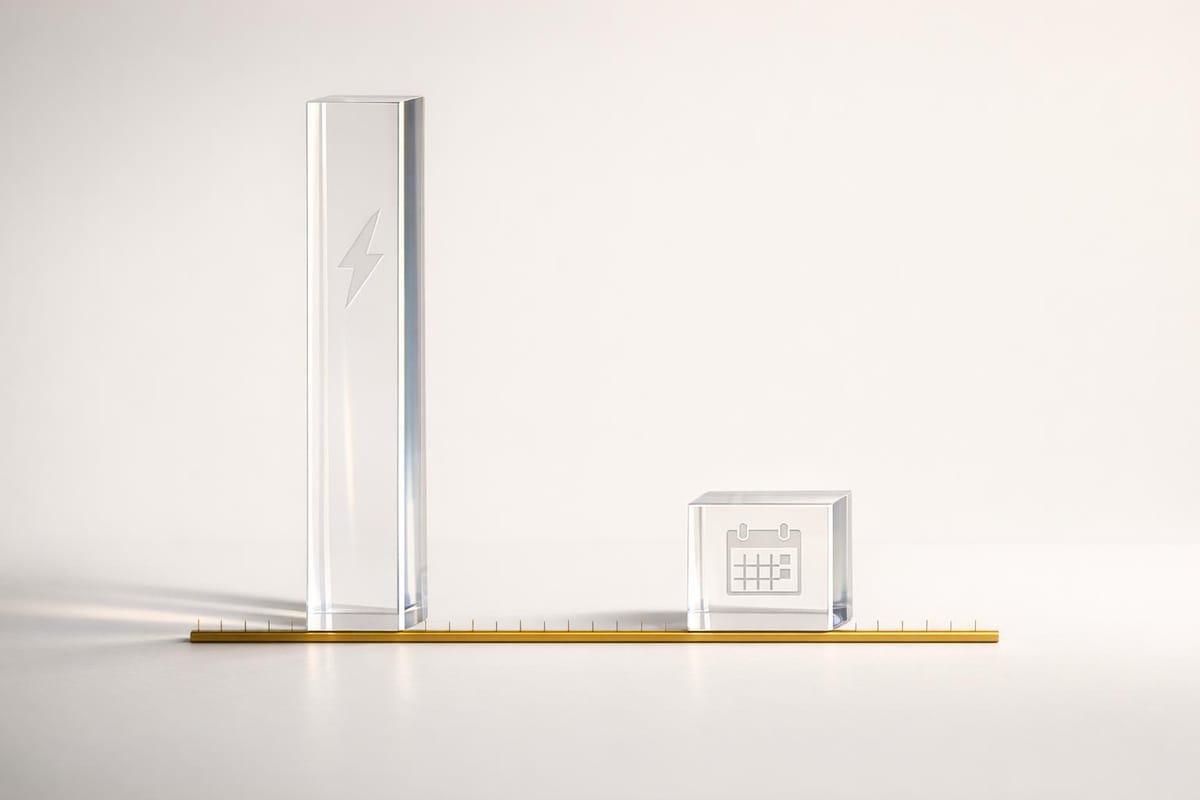
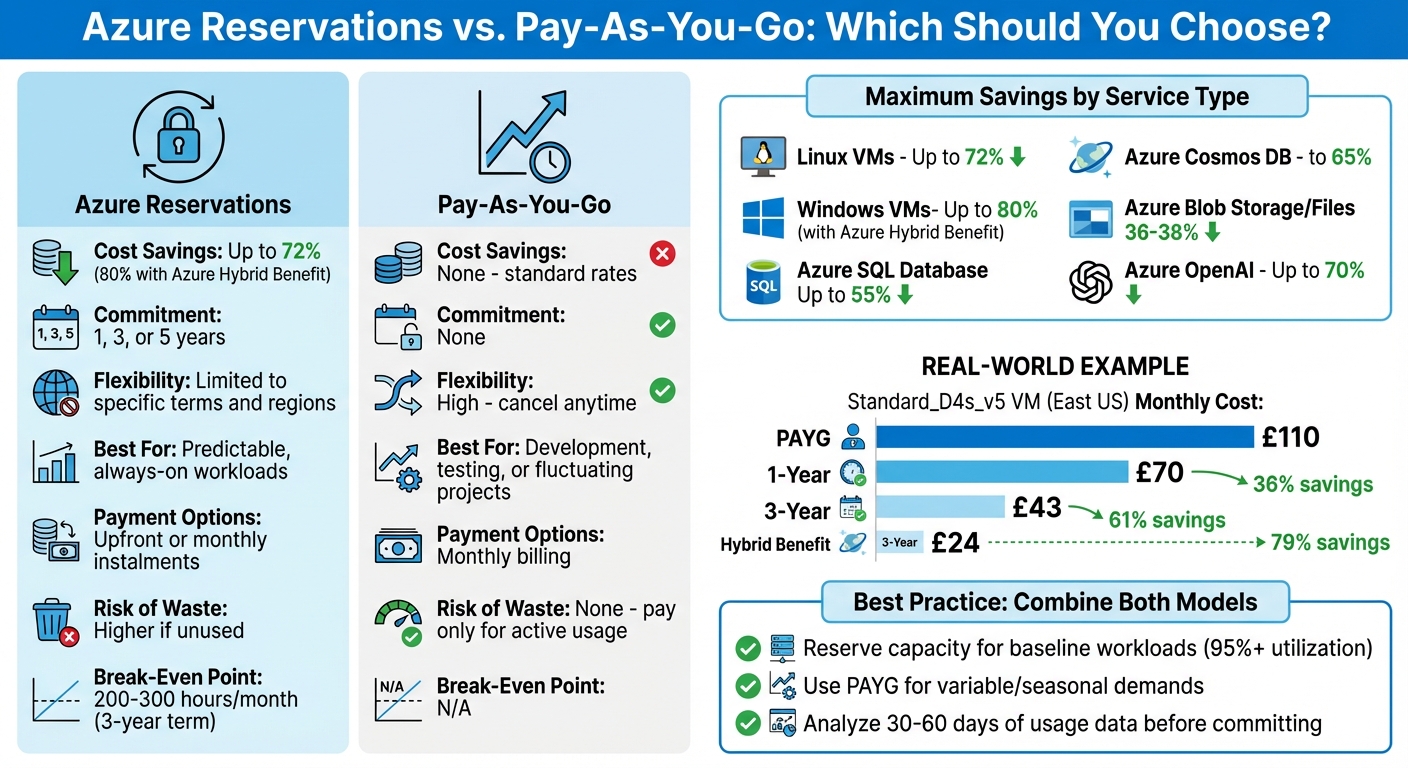
Which Azure pricing model should you choose? It depends on your workload. Azure Reservations offer up to 72% savings (or 80% with Azure Hybrid Benefit) for businesses with consistent, predictable usage. In contrast, Pay-As-You-Go (PAYG) provides flexibility for short-term or fluctuating workloads but charges higher rates.
Key differences:
- Reservations: Lower costs with 1- or 3-year commitments but risk "use-it-or-lose-it" waste if not fully utilised.
- PAYG: No commitment, higher costs, but perfect for variable or temporary needs.
Quick Comparison
| Feature | Azure Reservations | Pay-As-You-Go (PAYG) |
|---|---|---|
| Cost Savings | Up to 72% (80% with Hybrid Benefit) | Standard rates |
| Commitment | 1, 3, or 5 years | None |
| Flexibility | Limited to specific terms and regions | High |
| Best For | Predictable, always-on workloads | Development, testing, or fluctuating projects |
| Payment Options | Upfront or monthly instalments | Monthly billing |
| Risk of Waste | Higher if unused | None |
Bottom line: Use Reservations for steady workloads to reduce costs, and PAYG for flexibility. Combining both can balance savings and adaptability.
Azure Reservations vs Pay-As-You-Go Pricing Comparison
Azure Cost Savings Guide: Reserved Instances, Hybrid Benefit & Mobility
What Are Azure Reservations?
Azure Reservations provide a way to reduce costs by committing to using specific Azure resources for a fixed term - typically one year, three years, and occasionally five years. This commitment can offer savings of up to 72% compared to standard pay-as-you-go rates. When combined with the Azure Hybrid Benefit for Windows or SQL Server workloads, the total savings can reach up to 80%.
It's important to note that reservations don't impact the performance of your resources. As Intercept.cloud explains:
"Azure Reservations is nothing more than a billing discount; it won't affect the runtime status of your resources."
The discount is automatically applied to any matching usage on your bill, while your virtual machines (VMs), databases, or other services continue to function as usual.
However, reservations work on a "use-it-or-lose-it" principle. They are billed hourly, so if you don't have matching resources running during a specific hour, you lose the discount for that period.
You can choose to pay for reservations upfront or spread the cost over monthly instalments. Additionally, you can cancel reservations up to a limit of £50,000 within a rolling 12-month period. Microsoft may, however, introduce a 12% early termination fee in the future. These features make Azure Reservations a practical option for organisations looking to reduce costs strategically.
Key Features of Azure Reservations
Azure Reservations come with several features designed to offer flexibility and align with your organisation's needs:
- Scope Options: Discounts can be applied to a single resource group, a single subscription, or shared across multiple subscriptions, giving you the flexibility to match your organisation's Azure structure.
- Instance Size Flexibility: A single reservation can apply to multiple VM sizes within the same series and region. For instance, a reservation for a D4s_v5 instance could also cover two D2s_v5 instances.
- Exchange Capability: You can exchange reservations for another of the same type, such as swapping one VM series for another, as long as the new option is of equal or greater value. Although Microsoft initially intended to discontinue compute reservation exchanges on 1 January 2024, this deadline has been extended.
- Coverage Limitations: Reservations typically cover compute costs only. Charges for software licences (unless included), networking, and storage are billed separately. Additionally, certain VM types, such as A-series, G-series, and promotional instances, are usually excluded.
These features allow organisations, including small and medium-sized businesses, to optimise their budgets by ensuring resources are used effectively.
When to Use Azure Reservations
Azure Reservations are most effective for workloads with steady, predictable usage patterns. This includes production environments, large databases, and applications that operate continuously. If your services run 24/7 with minimal changes in resource consumption, locking in a discounted rate can significantly lower costs.
Before purchasing reservations, it's essential to analyse your usage patterns. Tools like Azure Advisor can review the last 30 days of usage and recommend the most cost-effective options. You can also download usage data as a CSV from the Azure portal to identify consistent baseline usage.
To maximise the benefits of Azure Reservations:
- Right-size your resources to eliminate waste.
- Exchange underutilised reservations for more suitable options.
- Convert reservations to Savings Plans if your usage patterns are variable.
- Purchase new reservations only for workloads with stable, predictable demand.
Additionally, enabling auto-renewal for reservations can help ensure uninterrupted discounts for workloads that require consistent capacity, avoiding a sudden switch back to full pay-as-you-go rates when the reservation term ends.
What Is Pay-As-You-Go Pricing?
Pay-As-You-Go (PAYG) is Azure's default billing approach, charging users based on how long they actively use resources - whether that's measured in seconds or hours. There are no upfront costs or long-term contracts, giving you the freedom to start and stop services as needed. Costs are calculated by multiplying the resource's unit price (such as a specific virtual machine type) by the time it’s used.
Paola Annis from Turbo360 explains it well:
"The pay-as-you-go model is the chameleon of cloud consumption. It adapts to varying workloads, allowing for dynamic scaling and flexibility." - Paola Annis, Turbo360
That said, PAYG uses standard list prices, which tend to be higher per unit compared to discounted rates available through other pricing models. Additionally, any resources not covered by an active Reservation or Savings Plan will default to PAYG rates. This makes it a great choice for workloads that fluctuate, but it’s worth comparing it to Azure Reservations to weigh your options.
Key Features of Pay-As-You-Go
PAYG is designed with flexibility in mind, making it a solid option for workloads that are unpredictable or temporary.
- Complete Flexibility: You’re only charged for the time resources are actively in use. There are no long-term commitments or "use-it-or-lose-it" rules.
- Straightforward Billing: Charges are applied monthly to a credit card or invoice, though prices may vary by region. Some PAYG subscriptions for reservations are unavailable in countries like Argentina, Brazil, India, and South Africa.
- Dynamic Scaling: This model supports real-time scaling, so your costs increase or decrease in line with your usage. While this transparency is helpful, it can lead to unpredictable bills if usage isn’t carefully tracked.
For small and medium-sized businesses (SMBs) with varying resource demands, PAYG provides the flexibility to adapt to changes, even though the per-unit cost is higher than other models.
When to Use Pay-As-You-Go
PAYG is particularly useful in scenarios where resources are temporary or usage patterns are hard to predict. For example:
- Development and Testing: Ideal for environments where resources are spun up for a short time and shut down after testing is complete.
- Unpredictable Spikes: Perfect for situations like the launch of a new e-commerce platform during a Black Friday sale. It allows you to manage sudden traffic surges and establish a usage baseline before committing to a reservation.
To make the most of PAYG, consider monitoring your usage over a period of 7, 30, or 60 days. This data can help you decide if a commitment-based model might save you money in the long run.
One thing to keep in mind: when a reservation expires, any associated resources will automatically revert to PAYG rates.
Cost Comparison: Azure Reservations vs Pay-As-You-Go
Now that we've explored the basics of both pricing models, let’s dive into the cost differences for small and medium-sized businesses (SMBs) aiming to optimise their Azure spending. These numbers provide a clearer picture of potential savings and when reservations make financial sense.
Take the Standard_D4s_v5 VM in East US as an example. On a Pay-As-You-Go (PAYG) model, it costs about £110 per month. Opting for a 1-year reservation reduces this to around £70 (a 36% saving). A 3-year reservation drops it further to roughly £43 (61% saving), and pairing a 3-year reservation with Azure Hybrid Benefit cuts it down to just £24 per month - a massive 79% saving.
These aren’t just hypothetical savings. Real-world examples show the impact of Azure reservations:
-
ABN AMRO: Hans De Kruif, Platform Engineer and Azure Cost Manager, shared how their Azure Reserved VM Instances strategy made a difference:
"Through Azure reservations, we've optimised our Azure spend over €1 million a month." - Hans De Kruif, ABN AMRO
-
Carlsberg Group: By using Azure Reservations and Hybrid Benefit, they achieved savings of 45–65%. Sonal Gupta, Senior Manager of FinOps, highlighted the budgeting benefits:
"The solution supports financial awareness; everyone feels accountable for their cloud spend and avoids additional costs. We can budget and forecast, investing in just what we need, without cost spikes." - Sonal Gupta, Carlsberg Group
Savings Analysis
Discount levels vary depending on the service and commitment term. Here's a breakdown of potential savings across different Azure services:
| Service Category | Resource Type | Maximum Savings |
|---|---|---|
| Compute | Linux Virtual Machines | Up to 72% |
| Compute | Windows VMs (with Hybrid Benefit) | Up to 80% |
| Databases | Azure SQL Database | Up to 55% |
| Databases | Azure Cosmos DB | Up to 65% |
| Storage | Azure Blob Storage / Files | 36%–38% |
| AI | Azure OpenAI (Foundry) | Up to 70% |
For another practical example, consider a D2ads v5 VM. On PAYG, it costs approximately £59 per month. A 1-year reservation lowers this to £35 (41% savings), while a 3-year reservation reduces it to just £22 (62% savings). Reservations can be paid upfront or monthly, providing flexibility for managing cash flow.
Break-Even Analysis
A key consideration is determining how long a resource needs to run before a reservation becomes more cost-effective than PAYG. This is where break-even analysis comes into play.
For a D2ads v5 VM costing £59 per month on PAYG versus £22 on a 3-year reservation, the hourly rates are approximately £0.081 and £0.030, respectively. Dividing the reserved monthly cost by the PAYG hourly rate, the break-even point is around 277 hours per month (roughly 11.5 days). If your VM runs more than this each month, the reservation pays off.
- 1-year reservations usually break even at about 450–500 hours per month.
- 3-year reservations hit break-even at just 200–300 hours per month due to their greater discounts.
To pinpoint your break-even point, download your usage data from the Azure Portal and identify your "base run rate" - the minimum number of resources consistently in use. Azure Advisor can also help by providing recommendations based on historical usage patterns, making it easier to identify workloads suitable for reservations.
For SMBs with changing needs, starting with a 1-year term is a smart way to assess usage patterns before committing to longer terms. Regularly reviewing and adjusting your strategy ensures you align your spending with your evolving workloads, making reservations a more economical choice in the long run.
Pros and Cons: Azure Reservations vs Pay-As-You-Go
When deciding between Azure Reservations and Pay-As-You-Go (PAYG), it’s important to weigh the advantages and disadvantages of each model. Reservations offer substantial discounts in exchange for long-term commitments, while PAYG provides flexibility with no upfront commitment, albeit at standard rates.
Comparison Table: Benefits and Drawbacks
| Feature | Azure Reservations | Pay-As-You-Go |
|---|---|---|
| Cost Savings | Discounts up to 72% (or 80% with Hybrid Benefit) | None - standard pricing applies |
| Commitment | Fixed terms of 1, 3, or 5 years | No commitment - cancel anytime |
| Flexibility | Limited - specific SKU and region restrictions | High - resources can be added or removed instantly |
| Budgeting | Predictable fixed costs | Costs vary monthly based on usage |
| Best For | Stable, always-on workloads | Development, testing, or fluctuating projects |
| Payment Options | Upfront or interest-free monthly instalments | Billed monthly based on actual consumption |
| Waste Risk | Higher - unused capacity cannot be reclaimed | None - only pay for active usage |
| Cancellation | Early termination fee of 12%; refunds capped at £40,000 within 12 months | No cancellation fees |
When paired with earlier cost analyses, this breakdown highlights the importance of aligning the pricing model with your specific workload needs. For instance, choosing the wrong SKU or region under Reservations could lead to unnecessary PAYG charges, emphasising the need for careful planning and governance.
How to Choose the Right Model
The right pricing model depends on your workload patterns and future requirements. Start by analysing usage data over the past 30–60 days or run new projects on PAYG for around three months to establish a usage baseline before committing.
- Azure Reservations: Ideal for workloads with consistent, predictable demands. Reserve capacity for core operations that run around the clock.
- PAYG: Suited for variable, short-term, or experimental workloads where flexibility is key.
As Brandon Wilson, a Cloud Solution Architect at Microsoft, explains:
"If you anticipate your infrastructure or workloads to change relatively frequently... then savings plans would make the most sense".
For businesses with fluctuating demands, starting with a 1-year reservation term can provide insights into usage patterns before committing to longer terms.
To maximise savings, monitor utilisation levels closely - aim for at least 95% usage of reserved capacity. Set up alerts or enable auto-renewal to avoid reverting to PAYG rates when reservation terms expire.
Using Both Pricing Models Together
Many SMBs don’t have to pick between Azure Reservations and Pay-As-You-Go (PAYG) - a smart strategy is to combine the two. Azure automatically applies discounts in a specific order: Reservations first, followed by Savings Plans, and then PAYG. This ensures that reserved capacity benefits from the biggest discounts, while any additional resources needed during peak times are charged at standard rates. Since Reservations are purely a billing mechanism and don’t influence performance or runtime, scaling remains smooth and straightforward. This blended approach balances predictable costs with the flexibility to adapt to changing needs.
Cost Reduction Strategies
To optimise your spending, start by analysing 30- to 60-day usage data through Azure Advisor. This helps identify your consistent, always-on workloads. Reserve capacity only for these steady workloads, such as core databases, production VMs, and always-on services. Meanwhile, keep development environments, temporary projects, and seasonal demands on PAYG.
Strive for a reservation utilisation rate of at least 95%. If utilisation falls below this, exchange the reservation for a different VM size or region to avoid wasted resources. Use automated budget alerts and anomaly detection tools to flag unexpected spikes in PAYG costs. These steps work alongside earlier break-even analyses to ensure reservations align with actual usage. Additionally, right-size your instances to avoid reserving more capacity than necessary.
For more detailed advice on splitting workloads and improving tagging strategies for better cost tracking, check out the Azure Optimization Tips, Costs & Best Practices blog. It’s packed with expert guidance tailored for SMBs scaling on Azure.
Scaling Examples for SMBs
Real-world examples show how this mixed model benefits SMBs. Imagine an SMB running a single D2 v3 VM (2 vCPUs, 8 GB RAM) in West Europe 24/7. By opting for a 3-year reservation for this VM, the monthly cost drops from approximately £122.26 (PAYG) to £83.41 (reserved) - a monthly saving of £38.85.
As the business grows to three VMs, the reserved instance continues to cover the baseline workload, while two additional VMs operate on PAYG during busy periods. If the company scales further to five VMs (one reserved and four PAYG), the total monthly cost comes to around £572.45. This hybrid model ensures the SMB commits only to its predictable needs while maintaining the flexibility to scale up or down without incurring extra financial penalties.
"Through Azure reservations, we've optimised our Azure spend over €1 million a month." - Hans De Kruif, ABN AMRO
"The solution supports financial awareness; everyone feels accountable for their cloud spend and avoids additional costs. We can budget and forecast, investing in just what we need, without cost spikes." - Sonal Gupta, Carlsberg Group
Conclusion: Choosing the Right Pricing Model
When comparing Azure's pricing models, the key is understanding your specific workload. For workloads that run continuously, like core databases or production VMs, Azure Reservations can slash costs by up to 72% compared to standard rates. This option also provides predictable monthly expenses, making it easier to manage budgets effectively.
On the other hand, Pay-As-You-Go (PAYG) is ideal for situations where flexibility is crucial. It allows you to scale resources up or down as needed, without financial penalties. This approach is particularly useful when usage patterns are unpredictable or when you’re experimenting with different configurations without committing to long-term costs.
Before deciding on a pricing model, it’s essential to analyse 30–60 days of usage data using tools like the Azure Portal or Azure Advisor. You can calculate the break-even point (reservation monthly cost ÷ PAYG hourly rate) to determine if reservations make financial sense for your workload. Additionally, ensure your resources are right-sized before making reservations. Over-provisioning and then locking those resources into a reservation can result in unnecessary waste.
For many small and medium-sized businesses, a hybrid approach works best. By reserving a baseline capacity for predictable workloads and using PAYG for fluctuating demands, you can strike the perfect balance between cost efficiency and flexibility. If you’re new to reservations, starting with a 1-year term is a practical way to test the waters before committing further as your usage patterns stabilise.
"The choice between reservations/SP and pay-as-you-go is not a one-size-fits-all decision. It's a strategic move that will leverage your organization's unique needs, workloads, capabilities, and financial goals." - Paola Annis, Turbo360
For more tips on managing Azure costs and optimising your cloud investment, check out Azure Optimization Tips, Costs & Best Practices: https://azure.criticalcloud.ai.
FAQs
How can I calculate my reservation break-even point?
To figure out your reservation break-even point, start by comparing the cost of a reservation to pay-as-you-go rates. Look at your regular usage patterns to get a clear picture of your needs. Then, calculate the total cost of the reservation - whether it's for a 1-year or 3-year term. Compare this total to what you'd spend with pay-as-you-go pricing. Finally, divide the reservation cost by the monthly savings to determine the minimum usage level required to make the reservation worthwhile. This process helps you decide if a reservation aligns with your budget and usage needs.
What happens if I don’t fully use my reserved capacity?
Unused reserved capacity doesn’t carry over to future hours. If your usage exceeds the reserved amount, you’ll be charged at standard pay-as-you-go rates. To keep costs under control, make sure your reservations closely match your usual usage patterns.
Can I change or cancel an Azure Reservation later?
Yes, you can cancel an Azure Reservation, though there might be a cancellation fee of up to 12%. Alternatively, reservations are exchangeable, giving you the flexibility to adjust or swap them to suit your needs. Be sure to review the policy details carefully to ensure they meet your expectations.